
[更新] 更新的基准测试结果请参见此处 。
近期备受期待的 Sphinx 3 已经 发布 并在 3.0.2 版本中更新 。它新增了文档存储功能、A-索引、片段预索引等功能,但不幸的是,它不再开源(至少在 2018 年 3 月之前是这样)。
这些功能都非常不错,但你是否关心 Sphinx 3 的性能受到了多大影响,以及与 Manticore 的性能差异有多大?我们也很感兴趣!
为了弄清楚这一点,我们进行了基准测试,以测量:
- 索引时间
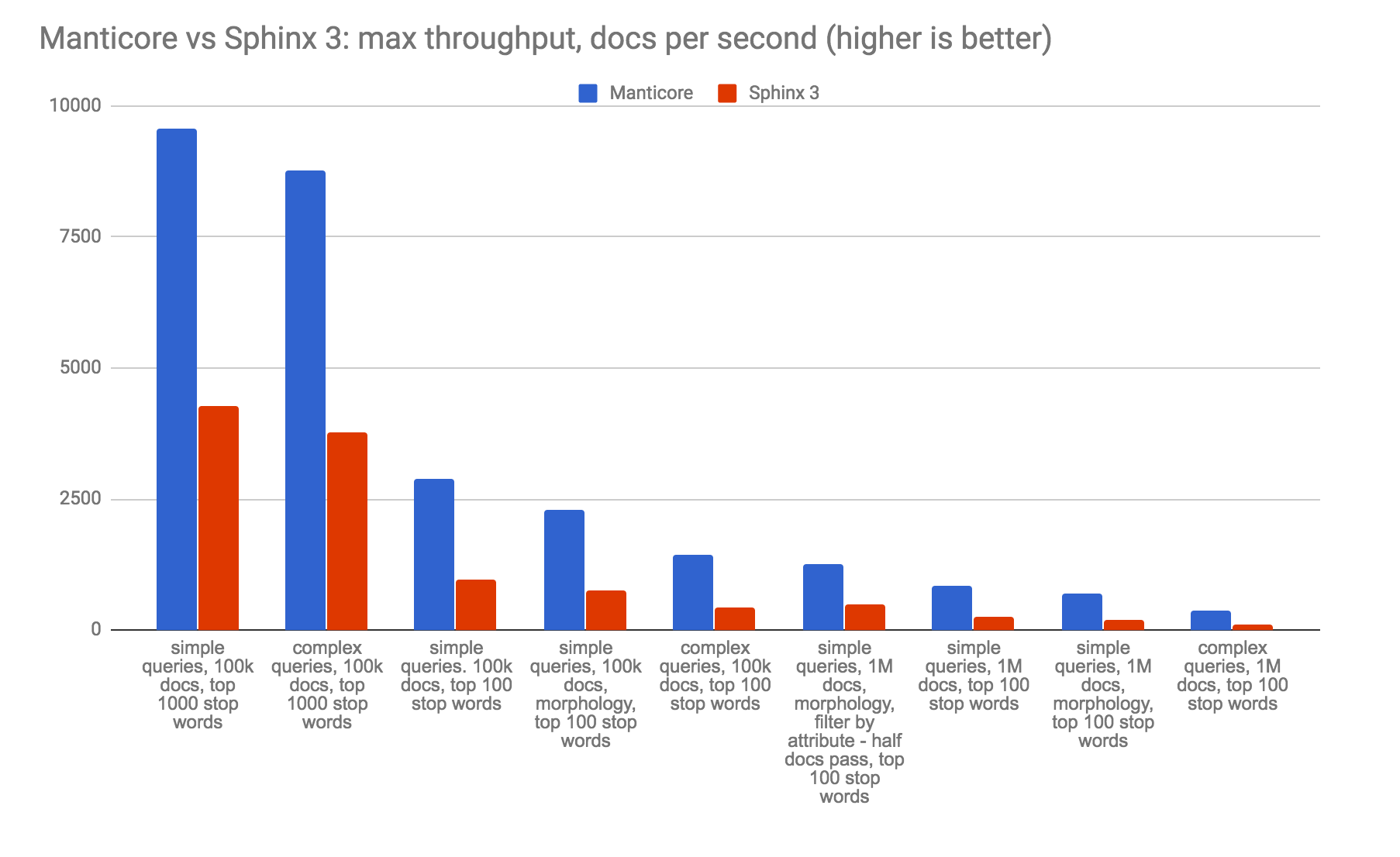
- Sphinx 3 和 Manticore Search 2.6.2 的最大吞吐量
- 两者提供的最小延迟
基准测试基于以下内容:
- luceneutil 用于生成索引和查询数据集
- lucene2manticore 用于将 Lucene 数据转换为 Manticore Search / Sphinx 格式
- stress-tester 用于基准测试
- 服务器:8xIntel(R) Xeon(R) CPU E3-1275 v5 @ 3.60GHz,64G RAM,HDD
- 操作系统:Ubuntu 16.04.3 LTS,内核 4.8.0-45-generic
以下是结果:
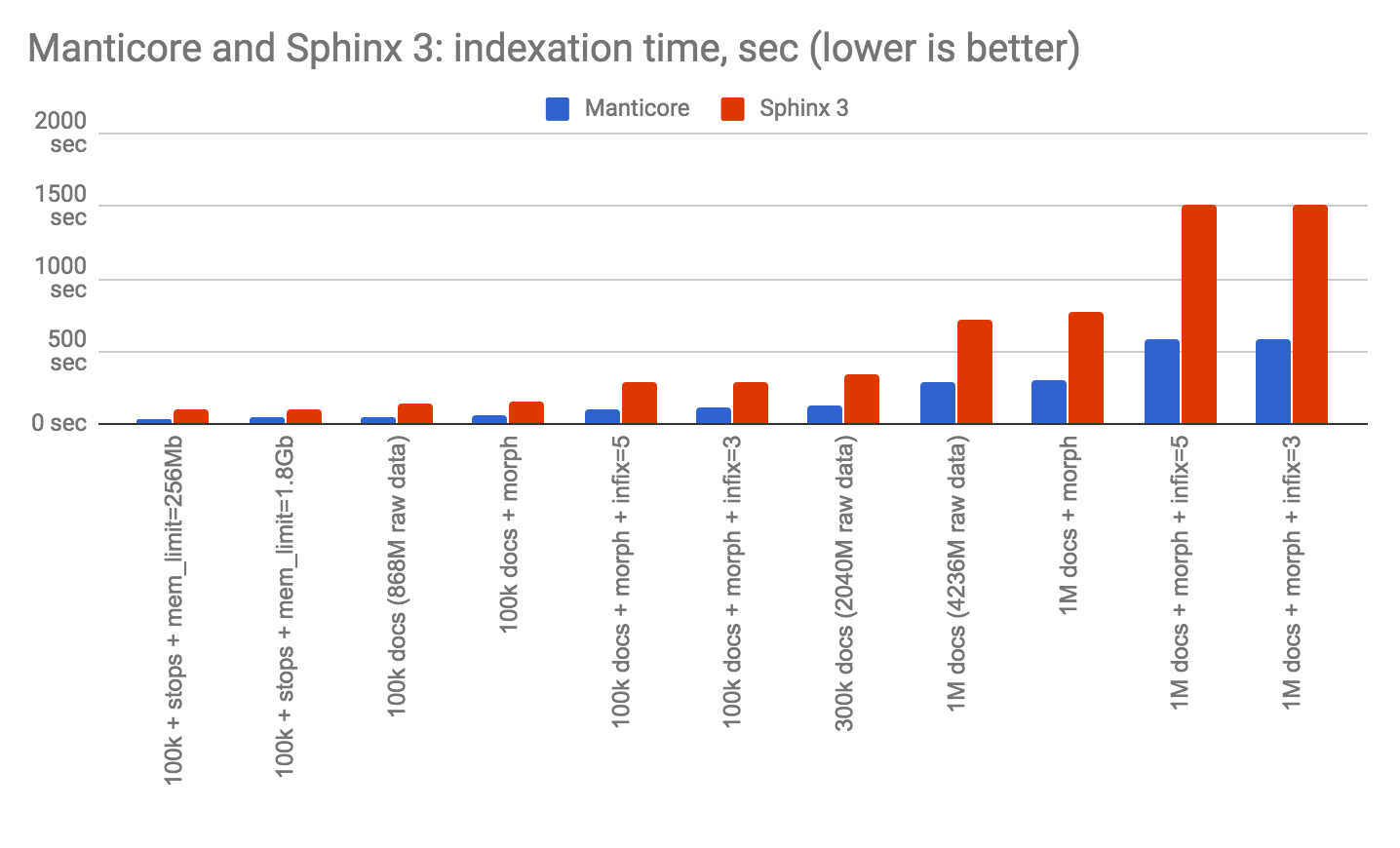


 可以看出 在所有测试场景中,Sphinx 3 的索引时间明显更高,性能也明显更差:吞吐量和延迟都更差。我们认为这可能是由于某些编译问题(再次强调,Sphinx 3 不再开源,因此我们无法重新编译)或某些总体性能漏洞,如果源代码可用,这些问题可以被调试和修复。如果新功能导致性能下降如此严重,那将是令人遗憾的。无论如何,我们想警告所有 Manticore 和 Sphinx 用户,如果您迁移到 Sphinx 3,可能会遇到性能下降的问题。
如果您有迁移到 Sphinx 3 的不同结果,或 Manticore 与 Sphinx 3 的比较结果,请告诉我们,我们将很乐意找出在哪些情况下性能不会下降。
以下是您如何重现基准测试的方法
请注意,下载和准备数据可能需要几个小时。
- 安装上述辅助工具并准备配置文件和停用词文件:
mkdir data
mkdir q

git clone http://github.com/mikemccand/luceneutil.git
git clone http://github.com/manticoresoftware/lucene2manticore
git clone http://github.com/Ivinco/stress-tester

cp lucene2manticore/*.conf ./
- 安装 Manticore Search 和 Sphinx3 的二进制文件。
- 获取并准备源数据
cd luceneutil
python src/python/setup.py -download
cd ../data/
xzcat enwiki-20120502-lines-1k.txt.lzma > lucene.tsv
将数据从 Lucene 类似 TSV 的格式转换为适合 Manticore Search 和 Sphinx 数据源使用的正确 TSV 格式:
cd ..
python lucene2manticore/lucene2tsv.py data/lucene.tsv --maxlen 2097152 > data/lc.tsv
head -n 100000 data/lc.tsv >  data/lc100k.tsv
head -n 300000 data/lc.tsv > data/lc300k.tsv
head -n 1000000 data/lc.tsv > data/lc1m.tsv
- 准备查询
python lucene2manticore/lucene2query.py --types simple data/wikimedium500.tasks > q/q-wiki500-simple.txt
python lucene2manticore/lucene2query.py --types ext2 data/wikimedium500.tasks > q/q-wiki500-ext2.txt
python lucene2manticore/lucene2query.py --types simple luceneutil/tasks/wikimedium.10M.datefacets.nostopwords.tasks > q/q-wiki10m-simple.txt
python lucene2manticore/lucene2query.py --types ext2 luceneutil/tasks/wikimedium.10M.datefacets.nostopwords.tasks > q/q-wiki10m-ext2.txt
python lucene2manticore/lucene2query.py --types simple luceneutil/tasks/wikimedium.1M.nostopwords.tasks > q/q-wiki1m-simple.txt
python lucene2manticore/lucene2query.py --types ext2 luceneutil/tasks/wikimedium.1M.nostopwords.tasks > q/q-wiki1m-ext2.txt
cat q/q-wiki*-simple.txt > q/q-simple.txt
cat q/q-wiki*-ext2.txt > q/q-ext2.txt
- 准备停用词
indexer -c lucene2manticore/sphinx3.conf i2_1m_no_stopwords --buildstops stopwords1k.txt 1000
head -100 stopwords1k.txt > stopwords.txt
- 索引数据并记住需要多长时间:
./indexer -c lucene2manticore/manticore.conf --all
./indexer -c lucene2manticore/sphinx3.conf --all
- 启动搜索守护进程
/path/to/manticore/searchd -c lucene2manticore/manticore.conf
/path/to/sphinx3/searchd -c lucene2manticore/sphinx3.conf
- 预热服务器
在测试之前预热搜索守护进程是有价值的,例如像这样:
cd stress-tester
for q in simple ext2; do for p in 8306 7406; do ./test.php --plugin=plain.php --data=../q/q-$q.txt -b=100 -c=8 --port=$p --index=i2_100k_stopwords_100 --maxmatches=100 --csv; done; done;
吞吐量测试用例
我们现在知道索引需要多长时间(见上文第 6 点)。现在看看 Sphinx 3 和 Manticore Search 能提供多大的吞吐量。
针对包含前 100 个停用词的 100K 文档索引的简单查询:
for port in 7406 8306; do for c in 1 4 6 8 12; do for batchSize in 1 100; do ./test.php --plugin=plain.php --data=../q/q-simple.txt -b=$batchSize -c=$c --port=$port --index=i2_100k_stopwords_100 --maxmatches=1000 --csv; done; done; done
针对包含前 1000 个停用词的 100K 文档索引的简单查询:
for port in 7406 8306; do for c in 1 4 6 8 12; do for batchSize in 1 100; do ./test.php --plugin=plain.php --data=../q/q-simple.txt -b=$batchSize -c=$c --port=$port --index=i2_100k_stopwords_1k --maxmatches=1000 --csv; done; done; done
针对包含前 100 个停用词的 100K 文档索引的复杂查询:
for port in 7406 8306; do for c in 1 4 6 8 12; do for batchSize in 1 100; do ./test.php --plugin=plain.php --data=../q/q-ext2.txt -b=$batchSize -c=$c --port=$port --index=i2_100k_stopwords_100 --maxmatches=1000 --csv; done; done; done
针对包含前 1000 个停用词的 100K 文档索引的复杂查询:
for port in 7406 8306; do for c in 1 4 6 8 12; do for batchSize in 1 100; do ./test.php --plugin=plain.php --data=../q/q-ext2.txt -b=$batchSize -c=$c --port=$port --index=i2_100k_stopwords_1k --maxmatches=1000 --csv; done; done; done
针对包含前 100 个停用词的 100K 文档索引的简单查询并启用词形变化:
for port in 7406 8306; do for c in 1 8; do for batchSize in 1 100; do ./test.php --plugin=plain.php --data=../q/q-simple.txt -b=$batchSize -c=$c --port=$port --index=i2_100k_stopwords_100_morphology --maxmatches=1000 --csv; done; done; done
针对包含前 100 个停用词的 1M 文档索引的简单查询:
for port in 7406 8306; do for c in 1 8; do for batchSize in 1 100; do ./test.php --plugin=plain.php --data=../q/q-simple.txt -b=$batchSize -c=$c --port=$port --index=i2_1m_stopwords_100 --maxmatches=1000 --csv; done; done; done
针对包含前 100 个停用词的 1M 文档索引的复杂查询:
for port in 7406 8306; do for c in 1 8; do for batchSize in 1 100; do ./test.php --plugin=plain.php --data=../q/q-ext2.txt -b=$batchSize -c=$c --port=$port --index=i2_1m_stopwords_100 --maxmatches=1000 --csv; done; done; done
针对包含前 100 个停用词的 1M 文档索引的简单查询并启用词形变化:
for port in 7406 8306; do for c in 1 8; do for batchSize in 1 100; do ./test.php --plugin=plain.php --data=../q/q-simple.txt -b=$batchSize -c=$c --port=$port --index=i2_1m_stopwords_100_morphology --maxmatches=1000 --csv; done; done; done
针对包含前 100 个停用词的 1M 文档索引的简单查询,并通过属性过滤以跳过一半的文档:
for port in 7406 8306; do for c in 1 8; do for batchSize in 1 100; do ./test.php --plugin=plain.php --data=../q/q-simple.txt -b=$batchSize -c=$c --port=$port --index=i2_1m_stopwords_100 --maxmatches=1000 --filter='ts<1199141654' --csv; done; done; done