
在本教程中,我们将探讨Manticore Search中可用的全文搜索运算符。
全文搜索运算符和基本搜索简介
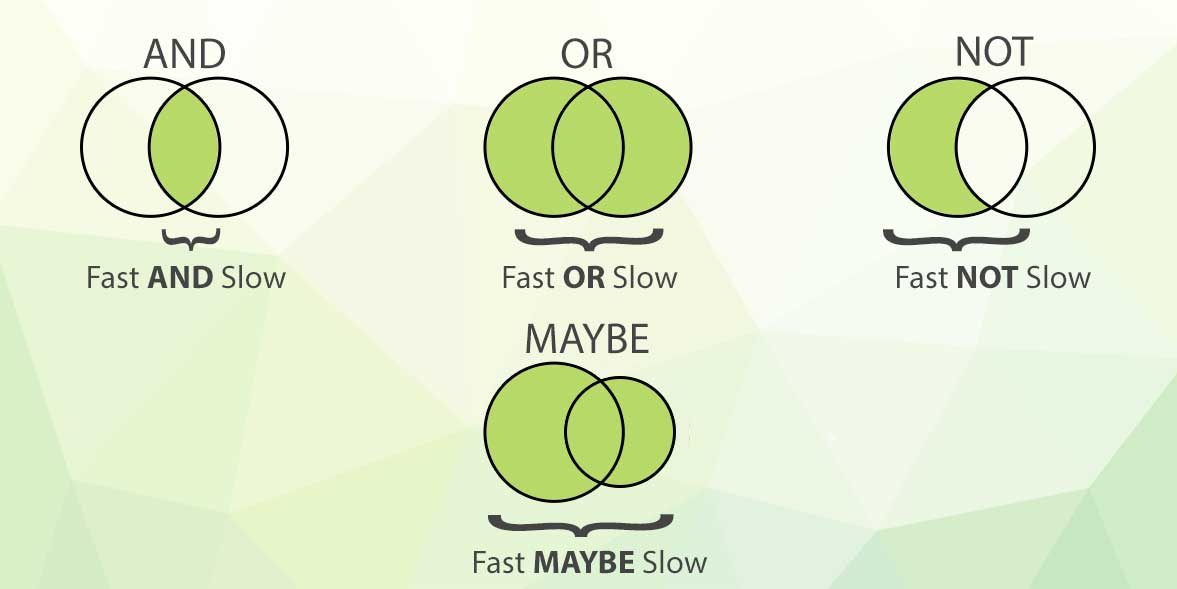
Manticore Search中的所有搜索操作都基于标准布尔运算符(AND,OR,NOT),这些运算符可以组合使用并以任意顺序排列,以组合或排除关键词以获得更相关的结果。
默认且最简单的全文搜索运算符是AND,当您只需在搜索中列出几个词时,就会默认使用该运算符。

fast slow 查询将返回同时包含两个词项 'fast' 和 'slow' 的文档。如果一个词项在文档中存在而另一个不存在,该文档将不会包含在结果列表中。
默认情况下,词语将在所有可用的全文字段中进行搜索。
SELECT * FROM testrt WHERE MATCH('fast slow');

fast | slow。它将找到包含 fast 或 slow 的文档。
SELECT * FROM testrt WHERE MATCH('fast | slow');
OR 运算符的优先级高于 AND,因此查询 'find me fast|slow' 可以被解释为 'find me (fast|slow)':
SELECT * FROM testrt WHERE MATCH('find me fast | slow');

- 或 ! 标记的词项不在结果中。任何包含此类词项的文档都将被排除。例如 fast !slow 将找到包含 fast 的文档,但前提是其中没有 slow。在尝试减少搜索范围时要小心使用它,因为它可能会变得过于具体并排除掉好的文档。
SELECT * FROM testrt WHERE MATCH('find !slow');

SELECT * FROM testrt WHERE MATCH('find -slow');

OR,但要求左侧的词项始终出现在结果中,而右侧的词项是可选的。但是当两个词项都满足时,文档将获得更高的搜索排名。例如 fast MAYBE slow 将找到包含 fast 或 slow 的文档,但同时包含两个词项的文档将获得更高的评分。
SELECT * FROM testrt WHERE MATCH('find MAYBE slow');
使用示例
让我们使用mysql客户端连接到Manticore:
# mysql -P9306 -h0
对于布尔搜索,可以使用 OR 运算符 |:
MySQL [(none)]> select * from testrt where match('find | me fast');
+------+------+------------------------+----------------+
| id   | gid  | title                  | content        |
+------+------+------------------------+----------------+
|    1 |    1 | find me                |  fast and quick|
|    2 |    1 | find me fast           |  quick         |
|    6 |    1 | find me fast now       |  quick         |
|    5 |    1 | find me quick and fast |  quick         |
+------+------+------------------------+----------------+
4 rows in set (0.00 sec)
OR 运算符的优先级高于 AND,查询 find me fast|slow 被解释为 find me (fast|slow):
MySQL [(none)]> SELECT * FROM testrt WHERE MATCH('find me fast|slow');
+------+------+------------------------+----------------+
| id   | gid  | title                  | content        |
+------+------+------------------------+----------------+
|    1 |    1 | find me                |  fast and quick|
|    2 |    1 | find me fast           |  quick         |
|    6 |    1 | find me fast now       |  quick         |
|    3 |    1 | find me slow           |  quick         |
|    5 |    1 | find me quick and fast |  quick         |
+------+------+------------------------+----------------+
5 rows in set (0.00 sec)
对于否定,运算符 NOT 可以指定为 - 或 !:
MySQL [(none)]> select * from testrt where match('find me -fast');
+------+------+--------------+---------+
| id   | gid  | title        | content |
+------+------+--------------+---------+
|    3 |    1 | find me slow |  quick  |
+------+------+--------------+---------+
1 row in set (0.00 sec)
必须注意,默认情况下Manticore不支持完整的否定查询,因此无法仅运行 -fast(从v3.5.2版本开始将支持)。
另一个基本运算符是 MAYBE。由 MAYBE 定义的词项可以在文档中存在或不存在。如果存在,它将影响排名,包含它的文档将获得更高的排名。
MySQL [(none)]> select * from testrt where match('find me MAYBE slow');
+------+------+------------------------+----------------+
| id   | gid  | title                  | content        |
+------+------+------------------------+----------------+
|    3 |    1 | find me slow           |  quick         |
|    1 |    1 | find me                |  fast and quick|
|    2 |    1 | find me fast           |  quick         |
|    5 |    1 | find me quick and fast |  quick         |
|    6 |    1 | find me fast now       |  quick         |
+------+------+------------------------+----------------+
5 rows in set (0.00 sec)
字段运算符
如果我们想将搜索限制在特定字段,可以使用运算符 '@':
mysql> select * from testrt where match('@title find me fast');
+------+------+------------------------+---------+
| id   | gid  | title                  | content |
+------+------+------------------------+---------+
|    2 |    1 | find me fast           |  quick  |
|    6 |    1 | find me fast now       |  quick  |
|    5 |    1 | find me quick and fast |  quick  |
+------+------+------------------------+---------+
3 rows in set (0.00 sec)
我们也可以指定多个字段来限制搜索:
mysql> select * from testrt where match('@(title,content) find me fast');
+------+------+------------------------+----------------+
| id   | gid  | title                  | content        |
+------+------+------------------------+----------------+
| 1    |    1 | find me                | fast and quick |
| 2    |    1 | find me fast           | quick          |
| 6    |    1 | find me fast now       | quick          |
| 5    |    1 | find me quick and fast | quick          |
+------+------+------------------------+----------------+
4 rows in set (0.00 sec)
字段运算符还可以用于限制搜索仅在前x个词中进行。例如:
mysql> select * from testrt where match('@title lazy dog');
+------+------+----------------------------------------------------------------------------+---------------------------------------+
| id   | gid  | title                                                                      | content                               |
+------+------+----------------------------------------------------------------------------+---------------------------------------+
|    4 |    1 | The quick brown fox jumps over the lazy dog                                |  The five boxing wizards jump quickly |
|    7 |    1 | The quick brown fox take a step back and  jumps over the lazy dog          |  The five boxing wizards jump quickly |
|    8 |    1 | The  brown and beautiful fox take a step back and  jumps over the lazy dog |  The five boxing wizards jump quickly |
+------+------+----------------------------------------------------------------------------+---------------------------------------+
4 rows in set (0.00 sec)
但是如果我们只在前5个词中搜索,我们将找不到任何结果:
mysql> select * from testrt where match('@title[5] lazy dog');
Empty set (0.00 sec)
在某些情况下,搜索可能需要在多个索引上执行,而这些索引可能没有相同的全文字段。
默认情况下,如果指定的字段在索引中不存在,将导致查询错误。为了解决这个问题,可以使用特殊运算符 @@relaxed:
mysql> select * from testrt where match('@(title,keywords) lazy dog');<br></br>ERROR 1064 (42000): index testrt: query error: no field 'keywords' found in schema
mysql> select * from testrt where match('@@relaxed @(title,keywords) lazy dog');
+------+------+----------------------------------------------------------------------------+---------------------------------------+
| id   | gid  | title                                                                      | content                               |
+------+------+----------------------------------------------------------------------------+---------------------------------------+
|    4 |    1 | The quick brown fox jumps over the lazy dog                                |  The five boxing wizards jump quickly |
|    7 |    1 | The quick brown fox take a step back and  jumps over the lazy dog          |  The five boxing wizards jump quickly |
|    8 |    1 | The  brown and beautiful fox take a step back and  jumps over the lazy dog |  The five boxing wizards jump quickly |
+------+------+----------------------------------------------------------------------------+---------------------------------------+
3 rows in set, 1 warning (0.01 sec)
模糊搜索
模糊匹配允许仅匹配查询字符串中的一些词,例如:
mysql> select * from testrt where match('"fox bird lazy dog"/3');
+------+------+----------------------------------------------------------------------------+---------------------------------------+
| id   | gid  | title                                                                      | content                               |
+------+------+----------------------------------------------------------------------------+---------------------------------------+
|    4 |    1 | The quick brown fox jumps over the lazy dog                                |  The five boxing wizards jump quickly |
|    7 |    1 | The quick brown fox take a step back and  jumps over the lazy dog          |  The five boxing wizards jump quickly |
|    8 |    1 | The  brown and beautiful fox take a step back and  jumps over the lazy dog |  The five boxing wizards jump quickly |
+------+------+----------------------------------------------------------------------------+---------------------------------------+
3 rows in set (0.00 sec)
在这种情况下,我们使用 QUORUM 运算符并指定匹配3个词即可。使用 /1 的搜索等同于OR布尔搜索,而使用 /N 的搜索(其中N是输入词的数量)等同于AND搜索。
除了绝对数字,您还可以指定0.0到1.0之间的数字(代表0%到100%),Manticore将仅匹配至少包含指定百分比的给定词的文档。上面的相同示例也可以写成 "fox bird lazy dog"/0.3,它将匹配至少包含4个词中30%的文档。
mysql> select * from testrt where match('"fox bird lazy dog"/0.3');
+------+------+----------------------------------------------------------------------------+---------------------------------------+
| id   | gid  | title                                                                      | content                               |
+------+------+----------------------------------------------------------------------------+---------------------------------------+
|    4 |    1 | The quick brown fox jumps over the lazy dog                                |  The five boxing wizards jump quickly |
|    7 |    1 | The quick brown fox take a step back and  jumps over the lazy dog          |  The five boxing wizards jump quickly |
|    8 |    1 | The  brown and beautiful fox take a step back and  jumps over the lazy dog |  The five boxing wizards jump quickly |
+------+------+----------------------------------------------------------------------------+---------------------------------------+
3 rows in set (0.00 sec)
高级运算符
除了较简单的运算符外,还有许多高级运算符使用较少,但在某些情况下可能是绝对必要的。
最常用的高级运算符之一是短语运算符
。
短语运算符仅在给定的词按逐字指定的顺序找到时才匹配。这还将限制词必须出现在相同的字段中:
mysql> SELECT * FROM testrt WHERE MATCH('"quick brown fox"');
+------+------+-------------------------------------------------------------------+---------------------------------------+
| id   | gid  | title            | content                               |
+------+------+-------------------------------------------------------------------+---------------------------------------+
|    4 |    1 | The quick brown fox jumps over the lazy dog            |  The five boxing wizards jump quickly |
|    7 |    1 | The quick brown fox take a step back and  jumps over the lazy dog |  The five boxing wizards jump quickly |
+------+------+-------------------------------------------------------------------+---------------------------------------+
2 rows in set (0.00 sec)
短语运算符的更宽松版本是严格顺序运算符。
顺序运算符要求词必须按指定的顺序找到,但允许其他词出现在它们之间:
mysql> SELECT * FROM testrt WHERE MATCH('find << me << fast');
+------+------+------------------------+---------+
| id   | gid  | title                  | content |
+------+------+------------------------+---------+
|    2 |    1 | find me fast           |  quick  |
|    6 |    1 | find me fast now       |  quick  |
|    5 |    1 | find me quick and fast |  quick  |
+------+------+------------------------+---------+
3 rows in set (0.00 sec)
另一对与词位置一起工作的运算符是开始/结束字段运算符。
这些将限制词必须出现在字段的开头或结尾。
mysql> SELECT * FROM testrt WHERE MATCH('^find me fast$');
+------+------+------------------------+---------+
| id   | gid  | title                  | content |
+------+------+------------------------+---------+
|    2 |    1 | find me fast           |  quick  |
|    5 |    1 | find me quick and fast |  quick  |
+------+------+------------------------+---------+
2 rows in set (0.00 sec)
邻近运算符 类似于 AND 运算符,但它会增加词语之间允许的最大距离,使其仍可被视为匹配。我们来看这个只使用 AND 运算符的示例:
mysql> SELECT * FROM testrt WHERE MATCH('brown fox jumps');
+------+------+----------------------------------------------------------------------------+---------------------------------------+
| id   | gid  | title                                                                      | content                               |
+------+------+----------------------------------------------------------------------------+---------------------------------------+
|    4 |    1 | The quick brown fox jumps over the lazy dog                                |  The five boxing wizards jump quickly |
|    7 |    1 | The quick brown fox take a step back and  jumps over the lazy dog          |  The five boxing wizards jump quickly |
|    8 |    1 | The  brown and beautiful fox take a step back and  jumps over the lazy dog |  The five boxing wizards jump quickly |
+------+------+----------------------------------------------------------------------------+---------------------------------------+
3 rows in set (0.00 sec)
我们的查询返回2个结果:一个结果中所有词彼此靠近,另一个结果中有一个词更远。
如果我们希望仅在词在一定距离内时才匹配,可以使用邻近运算符来限制这一点:
mysql> SELECT * FROM testrt WHERE MATCH('"brown fox jumps"~5');
+------+------+---------------------------------------------+---------------------------------------+
| id   | gid  | title                                       | content                               |
+------+------+---------------------------------------------+---------------------------------------+
|    4 |    1 | The quick brown fox jumps over the lazy dog |  The five boxing wizards jump quickly |
+------+------+---------------------------------------------+---------------------------------------+
1 row in set (0.00 sec)
邻近操作符的更通用版本是 NEAR 操作符。在邻近情况下,会在一个词袋中指定单个距离,而 NEAR 操作符使用两个操作数,这两个操作数可以是单个词或表达式。
在以下示例中,'brown' 和 'fox' 必须在距离 2 内,'fox' 和 'jumps' 必须在距离 6 内:
mysql> SELECT * FROM testrt WHERE MATCH('brown NEAR/2 fox NEAR/6 jumps');
+------+------+-------------------------------------------------------------------+---------------------------------------+
| id   | gid  | title                                                             | content                               |
+------+------+-------------------------------------------------------------------+---------------------------------------+
|    4 |    1 | The quick brown fox jumps over the lazy dog                       |  The five boxing wizards jump quickly |
|    7 |    1 | The quick brown fox take a step back and  jumps over the lazy dog |  The five boxing wizards jump quickly |
+------+------+-------------------------------------------------------------------+---------------------------------------+
2 rows in set (0.00 sec)
该查询排除了不满足第一个 NEAR 条件的文档(此处是最后一个):
mysql> SELECT * FROM testrt WHERE MATCH('brown NEAR/3 fox NEAR/6 jumps');
+------+------+----------------------------------------------------------------------------+---------------------------------------+
| id   | gid  | title                                                                      | content                               |
+------+------+----------------------------------------------------------------------------+---------------------------------------+
|    4 |    1 | The quick brown fox jumps over the lazy dog                                |  The five boxing wizards jump quickly |
|    7 |    1 | The quick brown fox take a step back and  jumps over the lazy dog          |  The five boxing wizards jump quickly |
|    8 |    1 | The  brown and beautiful fox take a step back and  jumps over the lazy dog |  The five boxing wizards jump quickly |
+------+------+----------------------------------------------------------------------------+---------------------------------------+
3 rows in set (0.09 sec)
NEAR 操作符的一个变体是 NOTNEAR,它仅在操作数之间有最小距离时匹配。
mysql> SELECT * FROM testrt WHERE MATCH('"brown fox" NOTNEAR/5 jumps');
+------+------+-------------------------------------------------------------------+---------------------------------------+
| id   | gid  | title                                                             | content                               |
+------+------+-------------------------------------------------------------------+---------------------------------------+
|    7 |    1 | The quick brown fox take a step back and  jumps over the lazy dog |  The five boxing wizards jump quickly |
+------+------+-------------------------------------------------------------------+---------------------------------------+
1 row in set (0.00 sec)
Manticore 还可以检测纯文本中的句子和 HTML 内容中的段落。
为了对句子进行索引,需要启用 index_sp 选项,而段落还需要 html_strip
=1。让我们以以下示例为例:
mysql> select * from testrt where match('"the brown fox" jumps')G
*************************** 1. row ***************************
id: 15
gid: 2
title: The brown fox takes a step back. Then it jumps over the lazydog
content:
1 row in set (0.00 sec)
该文档包含 2 个句子,而短语仅在第一个句子中找到,'jumps' 仅在第二个句子中。
使用 SENTENCE 操作符,我们可以将搜索限制为仅当操作数在同一个句子中时匹配:
mysql> select * from testrt where match('"the brown fox" SENTENCE jumps')G
Empty set (0.00 sec)
我们可以看到该文档不再匹配。如果我们修正搜索查询,使所有词都来自同一个句子,我们将看到匹配:
mysql> select * from testrt where match('"the brown fox" SENTENCE back')G<br></br>*************************** 1. row ***************************<br></br>id: 15<br></br>gid: 2<br></br>title: The brown fox takes a step back. Then it jumps over the lazydog<br></br>content:<br></br>1 row in set (0.00 sec)
为了演示 PARAGRAPH,让我们使用以下搜索:
mysql> select * from testrt where match('Samsung  Galaxy');
+------+------+-------------------------------------------------------------------------------------+---------+
| id   | gid  | title                                                                               | content |
+------+------+-------------------------------------------------------------------------------------+---------+
|    9 |    2 | <h1>Samsung Galaxy S10</h1>Is a smartphone introduced by Samsung in 2019            |         |
|   10 |    2 | <h1>Samsung</h1>Galaxy,Note,A,J                                                     |         |
+------+------+-------------------------------------------------------------------------------------+---------+
2 rows in set (0.00 sec)
这两个文档具有不同的 HTML 标签
如果我们添加 PARAGRAPH,只有包含搜索词在单个标签中的文档会保留。
更通用的操作符是 ZONE 及其变体 ZONESPAN。"zone" 是 HTML 或 XML 标签内的文本。
需要在 index_zones 设置中声明要用于区域的标签,例如 index_zones = h*, th, title。
例如:
mysql> select * from testrt where match('hello world');
+------+------+-------------------------------+---------+
| id   | gid  | title                         | content |
+------+------+-------------------------------+---------+
|   12 |    2 | Hello world                   |         |
|   14 |    2 | <h1>Hello world</h1>          |         |
|   13 |    2 | <h1>Hello</h1> <h1>world</h1> |         |
+------+------+-------------------------------+---------+
3 rows in set (0.00 sec)
我们有 3 个文档,其中 'hello' 和 'world' 出现在纯文本中,出现在相同类型的区域中或出现在单个区域中。
mysql> select * from testrt where match('ZONE:h1 hello world');
+------+------+-------------------------------+---------+
| id   | gid  | title                         | content |
+------+------+-------------------------------+---------+
|   14 |    2 | <h1>Hello world</h1>          |         |
|   13 |    2 | <h1>Hello</h1> <h1>world</h1> |         |
+------+------+-------------------------------+---------+
2 rows in set (0.00 sec)
在这种情况下,这些词出现在 H1 区域中,但它们不需要在同一个区域中。如果我们想将匹配限制在单个区域,可以使用 ZONESPAN:
mysql> select * from testrt where match('ZONESPAN:h1 hello world');
+------+------+----------------------+---------+
| id   | gid  | title                | content |
+------+------+----------------------+---------+
|   14 |    2 | <h1>Hello world</h1> |         |
+------+------+----------------------+---------+
1 row in set (0.00 sec)
希望从本文中,你已经了解了 Manticore 中 全文搜索操作符 的工作原理。如果你想通过实际操作来更好地学习,可以立即在浏览器中 尝试我们的交互式课程 。
交互式课程

如果你想了解更多关于全文匹配的内容,可以尝试我们的 "全文操作符入门" 交互式课程 ,该课程包含命令行以方便学习。