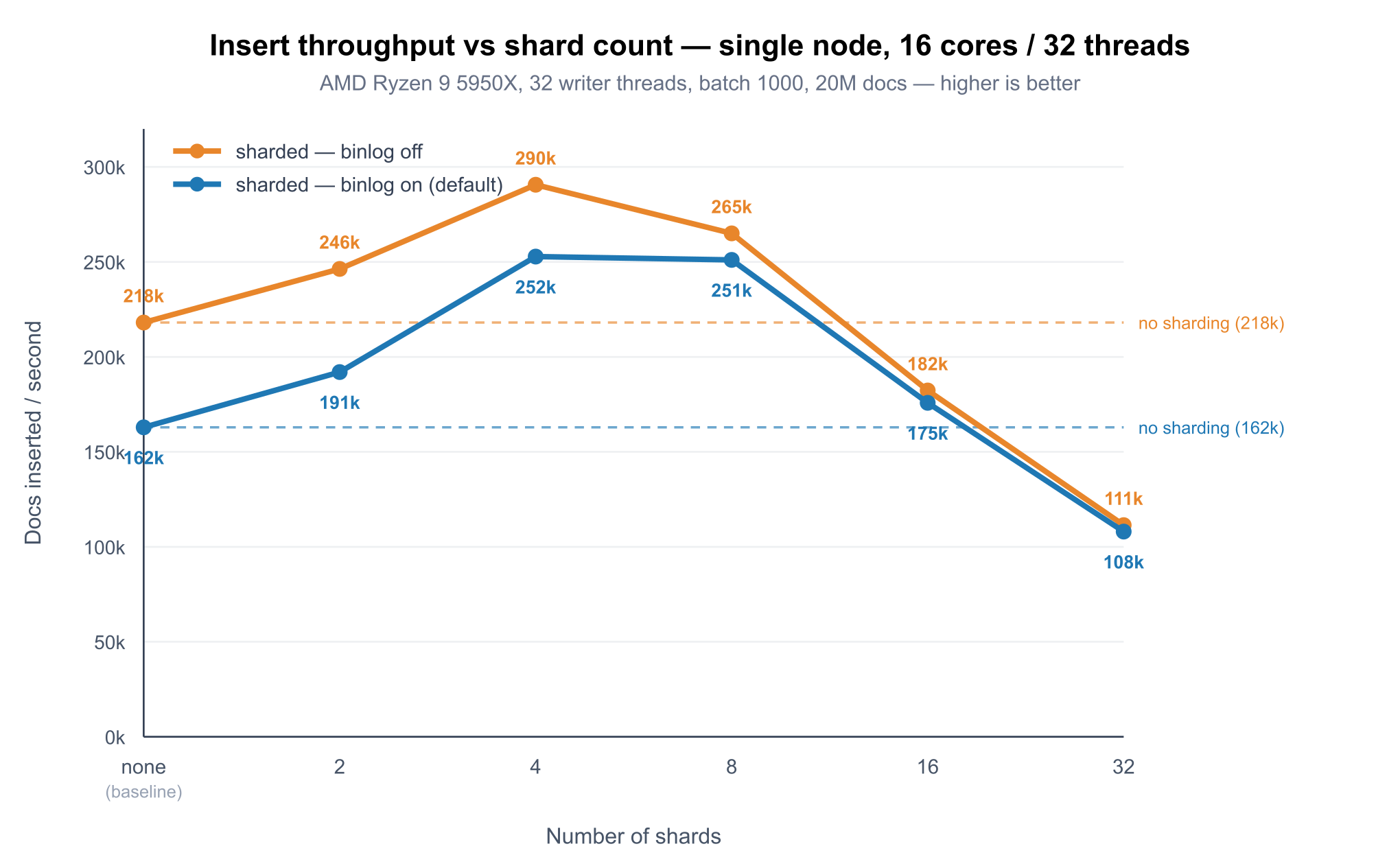

Search systems often start simple: one table on one server. That works until one of two things happens. Either a single query stops being able to use all the CPU you paid for, or a single server stops being enough — for capacity, for throughput, or for the simple fact that a server can fail and take your data with it.
The automatic sharding built into Manticore Search, available since release 27.1.5 , addresses both issues by splitting a table into several smaller physical pieces (shards), that can be searched in parallel and placed on different nodes:
- On a single node, sharding spreads concurrent writes across independent pieces and keeps each one small enough to stay fast.
- Across a cluster, sharding distributes data over multiple nodes and — this is the main point — automatically replicates each shard and keeps that replication factor intact as nodes fail and recover.
The second part is the real reason most people reach for sharding: high availability. You declare how many shards you want and how many copies of each should exist, and Manticore handles placement, replication, and rebalancing. You don't script failover.
Below: both use cases, the machinery without drowning in internals, the commands you'll run, and the current limits.
Short glossary
Key terms:
| Term | Meaning |
|---|---|
| Shard | One physical piece of a table — a real table that Manticore creates and manages for you. A table with shards='4' has four of them. |
| Replica | A copy of a shard on another node. Replicas are how data survives a node failure. |
| Replication factor (RF) | How many nodes hold a copy of each shard. rf='2' means every shard exists on two nodes. |
| Distributed table | The table you actually query. It has the name you gave it and transparently fans queries out to all shards. |
| Cluster | A Manticore replication cluster — the group of nodes between which data is replicated. |
| Master | The node that currently coordinates sharding operations (placement, rebalancing). Elected automatically. |
| Rebalancing | The automatic process that moves or copies shards when the set of nodes changes. |
How to create a sharded table
Sharding in Manticore is driven entirely by two simple options on CREATE TABLE:
CREATE TABLE products (id bigint, title text, price float) shards='4' rf='2'
shards='N'— split the table intoNphysical pieces.rf='M'— keepMcopies of each piece across the cluster (the replication factor).
In the common case, that one CREATE TABLE is all you write. There is no separate "make this distributed" step, no manual agent= lists as in older manual sharding setups, and no per-node table creation. Manticore creates the physical shards, places them, sets up replication, and creates a distributed table named products on every node, so the application can use the same table name from any cluster node.
Use case A: sharding on a single node
Start with the case where you have a single server — perhaps a big, many-core one — and no cluster yet. In this setup, sharding is not about storage durability; it helps use that one machine more effectively. If all writes go into one real-time table, concurrent INSERTs contend on the same internal table locks. As the table grows, RAM-chunk merges get heavier and can slow down ingestion. Splitting that table into several independent shards helps on both fronts: writes spread across the shards, and each piece stays small. High availability isn't part of the picture yet — that needs more than one node — so this is purely a performance play.
The simplest form has no cluster and rf='1':
CREATE TABLE logs (id bigint, message text, ts timestamp) shards='8' rf='1'
This creates eight physical shards on the one node and a distributed table logs that points at all of them. How does that help on a single machine?
- More concurrent ingestion. Each shard is an independent real-time table, so concurrent writes spread across them instead of serializing on one table's locks — the win the benchmarks below measure directly.
- Smaller pieces stay fast. Real-time tables periodically merge their internal RAM chunks. A table split into shards keeps each shard's chunks smaller, so those merges use fewer resources and are less likely to slow inserts down.
- Query parallelism (usually a small gain on one node). A distributed table searches its shards in parallel across the server's worker thread pool, so a single query can use several cores instead of one — bounded by
searchd.threadsand the number of physical cores. On a single node, though, this overlaps with pseudo-sharding , and the gain is usually small (~5–12%) — see the read benchmarks below .
If you've used Manticore's pseudo-sharding before, the goal may be familiar — use all the cores for one query — but the mechanism is different. Pseudo-sharding parallelizes a single physical table automatically at query time. Explicit sharding creates real shards you control: you decide how many, they're separate tables you can reason about, and — crucially — the same sharded table can later be spread across nodes without changing how your application talks to it.
The two are complementary, but they don't stack for free. Physical sharding — a distributed table over several local tables — already keeps the worker threads busy, so if you've explicitly sharded a table, enabling
pseudo_shardingon top usually adds little and can even cost a bit of throughput. Test it both ways withmanticore-load: run your workload with and withoutpseudo_sharding, and if it adds nothing on top of explicit shards, turn it off.
On a single node the replication factor must be 1: there's only one node, so there's nowhere to put a second copy. That's also the catch — single-node sharding gives you parallelism, not durability. For durability you need more than one node.
Use case B: multi-node sharding and automatic replication
This is what sharding is really for. Start from a replication cluster of several nodes (see Setting up replication
for how to create one), then create the table inside that cluster with the cluster: prefix and an RF greater than 1:
CREATE TABLE mycluster:products (id bigint, title text, price float) shards='4' rf='2'
Here's what Manticore does for you:
- Creates four shards.
- Places them across the cluster's nodes in a balanced way.
- Creates a second copy of every shard on a different node, because
rf='2'. - Wires up replication between each shard and its replica.
- Creates a distributed table
productson every node, so any node can serve reads and accept writes.
From the application's point of view, nothing changed — you still INSERT INTO products … and SELECT … FROM products. Reads fan out across the shards and the results are merged; writes are routed to a shard. But now every shard lives on two nodes, and that's the property you care about: any single node can fail and the table stays fully available with no data loss.
The replication factor scales with your durability needs and your node count:
| RF | Copies per shard | Survives | Typical use |
|---|---|---|---|
| 1 | 1 | nothing — a lost node loses its shards | single-node parallelism, dev/test, data you can rebuild |
| 2 | 2 | one node failure | the common production choice |
| 3+ | 3 or more | multiple simultaneous failures | mission-critical, frequent-failure environments |
The constraint is simple: you can't ask for more copies than you have nodes. rf='3' needs at least three nodes in the cluster. Manticore checks this when you create the table and tells you if the cluster is too small.
-- 6 shards, 3 copies each, across a 3+ node cluster
CREATE TABLE mycluster:events (id bigint, body text) shards='6' rf='3'
Putting it together: a multi-node walkthrough
Say you have a three-node replication cluster called mycluster (if you don't yet, Setting up replication
walks through CREATE CLUSTER and JOIN CLUSTER). Create a sharded, replicated table from any node:
CREATE TABLE mycluster:products (id bigint, title text, price float) shards='4' rf='2'
Manticore creates four shards, puts two copies of each across the three nodes, and a distributed table products on every node. Check the placement:
SHOW SHARDING STATUS products;
-- illustrative output (abbreviated columns)
+-------+-------+--------+----+-----------+
| shard | node  | status | rf | rf_status |
+-------+-------+--------+----+-----------+
|     0 | node1 | active |  2 | ok        |
|     0 | node2 | active |  2 | ok        |
|     1 | node2 | active |  2 | ok        |
|     1 | node3 | active |  2 | ok        |
|     2 | node1 | active |  2 | ok        |
|     2 | node3 | active |  2 | ok        |
|     3 | node1 | active |  2 | ok        |
|     3 | node2 | active |  2 | ok        |
+-------+-------+--------+----+-----------+
Every shard appears on two distinct nodes — that's rf=2 — and every rf_status is ok. (The full result also includes table, cluster, and replication_cluster columns.) Now use it like any other table, from any node:
INSERT INTO products (id, title, price) VALUES (1, 'Wireless mouse', 19.99);
SELECT * FROM products WHERE MATCH('mouse');
The write is routed to a shard and replicated to that shard's other copy; the read fans out across all four shards and merges the results. Your application never names a shard.
Maintaining the replication factor
Setting rf='2' is easy. The hard part in any distributed system is honoring that condition over time, as machines fail and come back and as you add capacity. But you no longer have to worry about that. Manticore Search automates this work.
How it works in Manticore is that the cluster elects a master node that runs a coordination loop. It monitors the cluster's topology — which nodes are alive — and reacts to changes:
A node fails
Its shards now have fewer copies than RF requires. The master detects the missing node and tries to rebuild the missing replicas. If the cluster still has at least rf active nodes after the failure, it places new copies on active nodes that don't already hold them, restoring the replication factor. Queries keep working as long as at least one copy of each shard is still available.
Continuing the walkthrough above — if node3 goes down, SHOW SHARDING STATUS products shows the affected shards as degraded (one copy down, one still up):
-- illustrative: node3 is down
+-------+-------+----------+----+-----------+
| shard | node  | status   | rf | rf_status |
+-------+-------+----------+----+-----------+
|     1 | node2 | active   |  2 | degraded  |
|     1 | node3 | inactive |  2 | degraded  |
|     2 | node1 | active   |  2 | degraded  |
|     2 | node3 | inactive |  2 | degraded  |
|   ... | ...   | ...      |    | ...       |
+-------+-------+----------+----+-----------+
There are still two active nodes (node1, node2) and rf=2, so the master creates the missing copies of shards 1 and 2 on the active node that lacks them. While a new copy is being built it shows up as pending; once replication catches up it becomes active and rf_status returns to ok.
The important caveat: Manticore can only restore RF if there is somewhere to put the new copy. If the active node count drops below rf, the requested RF cannot be met yet: affected shards stay degraded with their surviving copy until a node returns or you add one. Manticore won't create another copy of the same shard on the same node, and it won't silently pretend RF is met. If no live copy of a shard remains, its status becomes broken; that case is covered below. For rf='1', a failed node's shards are simply gone — there was never a second copy.
A node joins
New capacity should be used. The master rebalances so the new node takes its share of the load. How it does this depends on the RF:
- RF = 1: shards must be moved (there's only one copy, so it can't just be duplicated). Manticore moves them safely using a temporary internal cluster: it copies the data to the new node first and removes it from the old one only after that, so the shard always has an available copy.
- RF ≥ 2: shards are replicated to the new node using the cluster's existing replication, then the distribution is rebalanced. No risky data movement, because another copy always exists.
Every copy of a shard is down
If all nodes holding a given shard are lost at once, that shard's rf_status becomes broken — there's no surviving copy to serve or to replicate from. The rest of the table keeps working; the broken shard recovers when one of its nodes returns. RF reduces the chance of this case: with rf='2' it takes two simultaneous failures of the right nodes, with rf='3' three.
All of this happens through an internal, ordered, rollback-aware operation queue, so a rebalancing operation either completes or is cleanly rolled back — even if the master node itself dies mid-operation, the next master cleans up the half-finished work. The point for you as an operator: you set RF once, and the cluster works to keep it true.
How it works under the hood (the short version)
You don't need this to use sharding, but it helps to know what's happening.
- Physical shards are real tables. A table with four shards is backed by four real tables that Manticore creates and manages for you. You normally never touch them directly.
- Your application talks to a distributed table
. Manticore creates one named
productson every node. In its internal definition, local shards are listed directly, and shards on other nodes are connected throughagent. That's what makesSELECT … FROM productstransparently hit everything. - Coordination state lives in the cluster. Manticore tracks its own internal metadata — shard placement, coordination state, and the pending-operation queue — so it always knows who holds what and what work is still outstanding. In a multi-node setup this state is replicated across the cluster, so every node shares the same view.
- The master drives changes. Placement, replication setup, and rebalancing are computed by the master and pushed onto the queue as ordered commands with rollback instructions, then executed across nodes.
- Replication reuses Manticore's clustering. The same proven replication mechanism Manticore already uses for clusters keeps shard replicas in sync.
Architecturally:
            CREATE TABLE ... shards='4' rf='2'
                          │
                          ▼
                  ┌────────────────┐
                  │ Manticore      │  computes placement,
                  │ elected master │  enqueues ordered ops
                  └────────┬───────┘
                          │
        ┌─────────────────┼─────────────────┐
        ▼                 ▼                 ▼
    ┌──────────┐     ┌──────────┐     ┌──────────┐
    │  node1   │     │  node2   │     │  node3   │
    │ s0 s2 s3 │◄───►│ s0 s1 s3 │◄───►│  s1 s2   │   (each shard on 2 nodes = rf 2)
    └──────────┘     └──────────┘     └──────────┘
    distributed table "products" exists on every node
    (same placement as the SHOW SHARDING STATUS output above)
Operating a sharded table
Everything you'd expect to work, works — and there are a couple of sharding-specific commands for visibility.
Inspect the schema. DESC and SHOW CREATE TABLE work on the logical table; Manticore resolves them through the underlying shards:
DESC products;
SHOW CREATE TABLE products;
See where every shard lives and whether the RF is healthy. This is the command you'll watch during failures and rebalancing:
SHOW SHARDING STATUS products;
+-------+-------+--------+----+-----------+
| shard | node  | status | rf | rf_status |
+-------+-------+--------+----+-----------+
|     0 | node1 | active |  2 | ok        |
|     0 | node2 | active |  2 | ok        |
|   ... | ...   | ...    |    | ...       |
+-------+-------+--------+----+-----------+
It reports one row per shard copy, with these columns:
| Column | Meaning |
|---|---|
table | the logical table name |
shard | shard number |
node | the node holding this copy |
status | active, inactive (node down), or pending (being created) |
cluster | the replication cluster the table belongs to |
replication_cluster | the internal cluster that keeps this shard's copies in sync |
rf | how many copies this shard currently has |
rf_status | ok (RF satisfied), degraded (some copies down but at least one up), or broken (no copies up) |
rf_status is the at-a-glance health signal: all ok means the cluster is meeting the replication factor you asked for; degraded means it's working but exposed; broken means a shard is down.
Find the coordinator:
SHOW SHARDING MASTER;
Drop it cleanly. Dropping a sharded table works exactly like dropping a regular table — DROP TABLE removes the table and all its shards across the cluster:
DROP TABLE products;
Scale by changing the cluster. Because rebalancing is automatic, the way you scale a sharded table out is by adding nodes to the cluster (Adding a new node ). The master notices the new node and rebalances onto it without any action on the table itself.
Choosing how many shards and what replication factor to use
A few rules of thumb:
- Shards for faster writes: a handful of shards is usually enough, well below your core count — in the benchmarks below a 16-core / 32-thread box peaked at 4–8 shards and by 32 shards was slower than no sharding at all. Start small (4–8), measure, and only add more if your own numbers say so. More shards than that rarely helps and adds per-shard overhead.
- Shards for distribution: with multiple nodes, you want enough shards that they divide evenly across nodes and leave room to grow — a multiple of your node count is a good default. Don't go wild: each shard is a real table with its own overhead. (Manticore caps the shard count at 3000.)
- RF for durability:
rf='2'is the standard production choice — it survives any single node failure at 2× storage. Userf='3'only when you genuinely need to survive simultaneous failures or have strict availability requirements, and remember it costs 3× the storage and more replication traffic. - RF=1 is for performance or throwaway data only. It has no fault tolerance. Use it on a single node for parallelism, or in a cluster only when you have an external way to rebuild lost data.
Benchmarks: does sharding actually speed up inserts?
A feature is only worth using if it earns its keep, so we measured. The question we wanted answered honestly: for the same workload, does sharding make ingestion faster — and if so, when? The methodology was simple: compare every sharded run against the same baseline — a regular table without sharding.
In short: on a 16-core box with 32 concurrent writers, sharding raised insert throughput by about 1.5× at its best — from ~163k to ~253k docs/s — but only when the shard count stayed small. The best results came at 4–8 shards; by 32 shards, throughput had fallen below the unsharded baseline. The binary log cost roughly 25% of write performance, and rf=2 replication across two real machines cost about 30% more — fair prices for durability, but not free.
Setup. A dedicated server with no other significant CPU load — AMD Ryzen 9 5950X (16 cores / 32 threads), 128 GB RAM. Everything ran inside a single Docker container running a recent dev build with the sharding feature. Manticore ran with stock settings — no performance tuning: only listener ports, the data directory, and the binary log path were set; the thread pool, RT memory limits, and binary log behaviour were left at their defaults. Load came from manticore-load
. Each run inserts the same documents — (id bigint, name text, type int) where name is 10–100 random words — in batches of 1000 into a real-time table. Only the shard count, the replication factor, and the binary log change between runs; the "no sharding" baseline is a plain RT table. We run the full single-node shard sweep twice — once with the binary log on (the default), once with it off — inserting 20,000,000 docs per run with 32 concurrent writers.
# the exact shape of every insert run (shards/rf vary)
manticore-load --batch-size=1000 --threads=32 --total=20000000 \
  --init="create table test(id bigint, name text, type int) shards='8' rf='1'" \
  --load="insert into test(id,name,type) values(<increment>,'<text/10/100>',<int/1/100>)"
Single node: throughput vs shard count
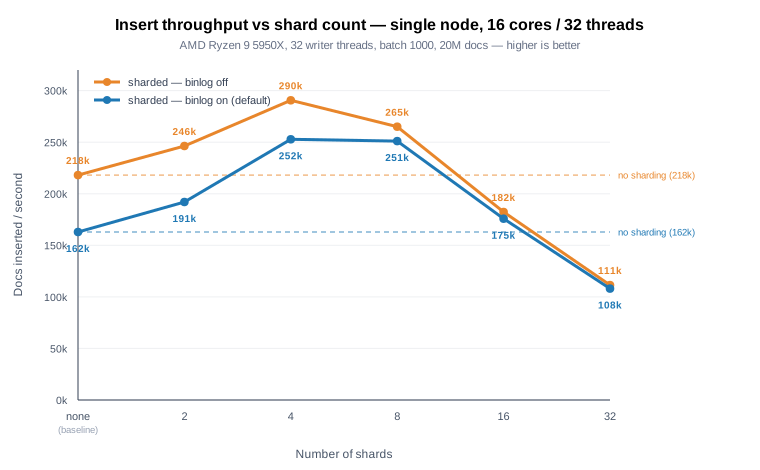
Docs inserted per second, 20M docs, 32 writers — both binary log modes:
| Shards | binary log on (default) | binary log off |
|---|---|---|
| none (baseline) | 162,920 | 218,079 |
| 2 | 191,976 | 246,288 |
| 4 | 252,807 | 290,665 |
| 8 | 251,008 | 265,015 |
| 16 | 175,848 | 182,288 |
| 32 | 108,006 | 111,381 |
The chart plots the full sweep twice — binary log on (blue, the default) and off (orange). Three things stand out:
- Concurrent inserts get a real boost. With 32 writers, splitting the table lifts throughput by ~1.5× at the peak — from 163k to 253k docs/s on the default (binary-log-on) line. Each shard is an independent real-time table, so spreading writes across several sharply cuts the lock contention a single RT table hits under concurrency, and lets the inserts use more cores.
- The best range is small — 4–8 shards. The gain peaks there and then falls off fast. By 16 shards it's barely above baseline, and at 32 shards throughput is below the unsharded table (0.66×) — past that range, per-shard and coordination overhead outweighs the extra parallelism. More shards is emphatically not better. Both lines have the same shape and the same best range — the binary log doesn't move it.
- Durability costs most where you're fastest. Turning the binary log off (orange) lifts the whole curve, but the gap is widest in the high-throughput region — 253k → 291k at 4 shards — and nearly vanishes once the shard count is too high (108k vs 111k at 32 shards), where coordination overhead, not durability, is the bottleneck. We measure the binary-log impact separately below.
One caveat worth stating plainly: this speedup comes from concurrent writes. A single, strictly-sequential writer can't exploit parallel shards and will see no speedup (and a touch of distributed-layer overhead). Sharding pays off when many clients or consumers write at once — which is what real ingestion pipelines do.
The cost of durability: the binary log
Manticore's binary log makes inserts crash-safe (it can replay un-flushed transactions after an unclean shutdown). It's on by default. You can already see its cost in the chart above — the orange (binary-log-off) line runs above the blue one. Isolating it on the plain unsharded baseline, with only binlog_path changing:
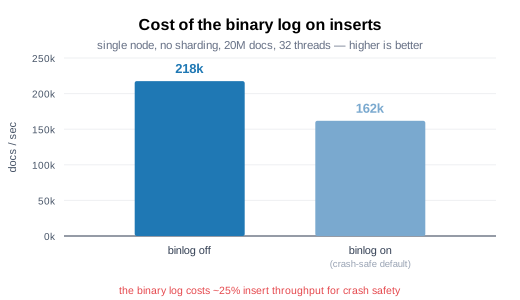
Disabling the binary log raised baseline throughput from 162k to 218k docs/s — so crash-safe inserts cost roughly 25%. That's the price of not losing un-flushed writes on a hard crash; leave it on in production unless you can rebuild the data from source and want the extra speed during bulk loads.
The cost of replication on writes
Durability across machines isn't free either — and this is the one test that's only honest on real, separate hardware. So unlike the single-node benchmarks above, we ran the two replication tests on two distinct physical machines: two 4-core / 7 GB cloud VMs joined as a Manticore cluster. That way rf=1 and rf=2 never fight over the same cores or memory — the fair comparison a single box simply can't give.
rf=1 keeps a single copy on one machine; rf=2 keeps a full copy on both, so every insert is synchronously replicated across the network before it's acknowledged. Same 1M-doc load, 4 writer threads:
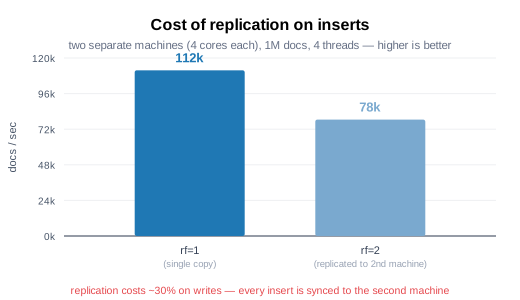
Replication cost about 30% of insert throughput (112k → 78k docs/s) — the price of copying every write to the second machine before acking. That's the rf trade-off in one number: write a bit slower, survive losing an entire machine.
Do sharding and replication speed up reads?
Reads are easy to measure wrong, so first the method. A trivial query — fetch 20 rows, no ranking — runs in well under a millisecond, so its cost is all fixed overhead; a distributed table that hops to an agent then looks ~3× slower (≈7,700 vs 2,400 q/s here) purely because the network round-trip dwarfs the near-zero work. That's not a real query. A realistic full-text query (a few terms to match and rank, ~10–30 ms) tells the truth: the distribution overhead shrinks to a few percent, because now real work dominates the fixed cost. The numbers below all use realistic queries on the 2-node cluster, read from a single entry node.
# realistic read — what the numbers below use: full-text match-and-rank, ~10–30 ms each
manticore-load --threads=4 --total=5000 \
  --load="select id from <table> where match('<text/1/5> <text/1/5>')"

# trivial read — sub-ms, all fixed overhead, exaggerates distributed cost ~3x
manticore-load --threads=4 --total=20000 \
  --load="select id from <table> limit 20 option ranker=none"
<table> is one of: a plain RT table (no sharding), a type='distributed' table over local shards (single-node sharding — local='s0' local='s1' …), or a sharded table with shards='4' rf='1'/rf='2'. Every read is issued to one node — we never query both nodes as separate clients.
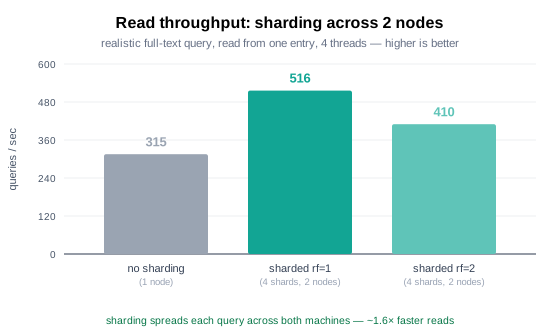
- Sharding across nodes speeds reads up. A 4-shard
rf=1table spread over both machines does ~516 q/s vs ~315 for a single unsharded node — about 1.6× — because each query runs across both nodes' cores at once. - Replication keeps reads fast.
rf=2(every shard on both nodes) does ~410 q/s — a touch belowrf=1. The reason is not that the load sticks to one node (it spreads across replicas); it's that withrf=2every shard is reached through the agent/mirror path — even the copies that happen to be local — and that path costs the few percent noted above, whereasrf=1reads its on-node shards in-process. Either way reads stay well above a single node, and the data now survives a machine loss. - On one box, sharding's read win is small. Splitting a table into 2–4 shards on a single node adds only ~5–12% (query parallelism), and only when there are spare cores — heavier queries help (≈12% vs ≈3% for light ones), but a fully-loaded box is a wash. The real read scaling comes from adding machines, not shards on one box.
Method note: the read and replication tests run on a separate pair of cloud VMs — 4 vCPU / 7 GB RAM each, two distinct physical machines — joined as a 2-node Manticore cluster, same recent dev build, stock settings, 1.5M docs. They are a different, much less powerful setup than the 16-core / 32-thread server used for the insert sweeps above, so draw conclusions within each test, not across them. The small core count is also why single-node sharding's read gain is modest here — there are few spare cores for a query to parallelize across.
Bottom line
- On one box, sharding gives a ~1.5× concurrent insert speedup (163k → 253k docs/s here at 20M).
- The best range here is 4–8 shards on this 16-core / 32-thread CPU. Too many shards hurts: at 32 shards throughput fell below the unsharded baseline. Match shard count to cores and write concurrency, not to a big round number.
- The binary log costs ~25% of write throughput (and the gap shrinks to near-zero once the shard count is too high), and
rf=2replication ~30% on writes (measured on two separate machines) — both fair prices for crash safety and node-failure survival, respectively. - With realistic full-text queries, sharding across a 2-node cluster reads ~1.6× a single node, and
rf=2keeps reads fast while surviving a node loss. Trivial id-lookup queries exaggerate distributed overhead ~3× — always benchmark reads with realistic queries. - Absolute numbers depend on hardware and document shape; what travels between setups is the shape of these curves — so benchmark your own workload before committing to a shard count.
Limitations and things to know
There are sharp edges worth knowing up front:
rfis required. A shardedCREATE TABLEmust specifyrf=. If you omit it,CREATE TABLEfails.rfgreater than 1 requires a cluster. You can't create a multi-copy sharded table on a standalone node — there's nowhere to put the copies. Multi-copy tables must use thecluster:nameform.- Local sharded tables can't be created on a node that's already in a cluster. If a node belongs to a replication cluster, create the table in that cluster (
CREATE TABLE cluster:name …) rather than as a local table, or the sharding metadata won't be tracked correctly. Manticore detects this and tells you. - Maximum 3000 shards per table.
- RF=1 means no fault tolerance. A lost node's shards are gone. This is inherent, not a bug — it's the trade-off you accept for
rf='1'. - You need at least RF nodes.
rf='M'requires a cluster of at leastMnodes; creation fails otherwise. - Creation is synchronous up to a timeout.
CREATE TABLEwaits for the distribution to complete (default 30s). For very large shard counts, raise it withtimeout='N'(seconds), e.g.shards='3000' rf='3' timeout='60'.
Where this leaves you
Sharding in Manticore covers a wide span with a deliberately small interface. With shards='N' rf='1' on a single box, sharding spreads concurrent writes across independent pieces and keeps each one small. With shards='N' rf='M' inside a cluster, it gives you a distributed, replicated table that survives node failures and rebalances itself when the cluster changes — without you writing a line of failover logic. The same table definition grows from one node to many, and your application keeps talking to it the same way throughout. In practice, this means you can start by improving write throughput on one node and later move to a fault-tolerant cluster without changing the application.
To go deeper into the building blocks sharding stands on:
Have a sharding question or a workload you'd like us to benchmark? Let us know .