
“The world is changed. I feel it in the water. I feel it in the earth. I smell it in the air.”
— Galadriel, The Lord of the Rings: The Fellowship of the Ring
Search has changed too. For a long time, when you needed search for a product catalog, you mostly thought about words: how to process them, handle typos, and rank the results. Those questions haven't gone away. It's just that now, alongside full-text search, we have vectors, hybrid search, image search, and AI that can give you an answer instead of a list of products.
Every approach sounds great until you try it on actual queries. Say someone searches for merino wool socks. Vector search gets the merino wool part and serves up pants, a jacket, another pair of pants, and a T-shirt. The socks finally show up in fifth place.
So which type of search is better? Rather than argue about it, we decided to give them all the same product catalog and see what happens.
That's how we ended up building Manticore Search Playground . It has seven tabs: you can search by words, meaning, photos, or location, compare the results, and ask AI questions. And beneath every set of results, you can see the SQL query that produced it, along with an equivalent HTTP JSON API request.

It's more than a demo with nice-looking product cards. It's a small open-source application
you can run locally with Docker Compose and explore for yourself. Full-text, vector, hybrid, and geo search all use one product table. For photos, we added another table and an embedding service; for AI, we use CALL CHAT (a Manticore SQL command).
Below, we'll walk through real queries, some unexpected results, and the SQL behind them. All result counts and timings come from the public Playground as it was in September 2026. They may change as the catalog, models, or application are updated.
What are we actually comparing?
We took 82,524 products from Google's ConvApparel dataset, which is about helping people choose clothes. The recommendations in those conversations contain product names, descriptions, features, and photos.
The same data powers seven tabs: Full-text, Vector, Hybrid, Image, Geo, Compare, and Ask AI. For every search, Playground shows both the SQL and a curl command. You can run either against your own Manticore instance.
Why does this matter? Because comparing search engines often means looking at two different demos using two different datasets. Here, the catalog stays the same. Only the search method changes, so you can see the difference right away.
For most of the modes, one table was enough:
CREATE TABLE convapparel_products (
    id bigint,
    item_id text,
    title text,
    description text,
    features text,
    image_url text,
    category string indexed attribute,
    source text,
    categories json,
    lat float,
    lon float,
    embedding_vector float_vector knn_type='hnsw' hnsw_similarity='COSINE'
        model_name='onnx-models/all-MiniLM-L12-v2-onnx' from='title,description,features'
) min_infix_len='2'
Two things worth noting if you're building something with Manticore yourself:
min_infix_len='2'lets you search for parts of words starting at two characters. That's useful for suggestions and autocomplete.model_nametogether withfrom='title,description,features'enables automatic embeddings . Add a product, and Manticore calculates an embedding from its text fields. Search by meaning, and the query is turned into an embedding using the same model. No extra service needed for that.
Photos work a little differently, but we'll get to those later.
1. Full-text search: two typos, zero results
Let's start with good old full-text search. Imagine a shopper meant to type leather jacket but entered lether jaket instead. Two typos in two words. Nothing unusual for an online store.
Turn off Typo tolerance, and Playground returns zero products.

Turn typo tolerance back on, and suddenly we get 1,027 products. Leather jackets are right at the top, as you'd expect.

Here's the query with typo tolerance enabled:
SELECT id, title, description, features, category, image_url, weight() AS text_score
FROM convapparel_products
WHERE MATCH('lether jaket')
LIMIT 12
OPTION fuzzy=1
FACET categories ORDER BY COUNT(*) DESC
What's going on here? MATCH() searches the text fields. weight() gives us a relevance score. The default ranking algorithm is proximity_bm25, which takes both BM25 and the distance between words into account.
But the important bit here is OPTION fuzzy=1
. It lets the search match words with similar spellings. Remove it: zero results. Put it back: leather jackets.
There are two UX details worth thinking about if you're adding this kind of search to an app.
- Tell people when you've corrected their query. Playground calls
CALL QSUGGESTand displays Showing results for leather jacket. If the search engine guesses wrong one day, at least the user can see where those strange results came from. - Don't expect users to write full Manticore search expressions when typo tolerance is on. People type ordinary phrases, not carefully constructed
MATCH()expressions. In fuzzy-search mode, operator characters are escaped (except quotation marks used for phrase search).
We found 1,027 products, but the categories add up to 1,127. Wait, what?
At the end of that SQL query there's FACET categories. It returns the products along with a breakdown by category
. For our query, we get:
Outerwear — 960, Footwear — 58, Tops — 55, Bottoms — 54.
Add them up and you get 1,127, even though there are only 1,027 search results.

No, the math isn't broken. A product can belong to more than one category. So it may be counted several times across categories, but only once in the overall total.
Here's how we handle it:
- Store categories as a JSON array. A product might belong to both
["outerwear", "tops"], for example. - Filter with
categories IN ('outerwear', 'tops'). A product matches if it belongs to at least one of the selected categories. - Get the total number of products with a separate
COUNT(*), rather than adding up facet counts and counting some products more than once.
Why autocomplete shouldn't suggest print when you type int
There's another familiar feature that can get annoying pretty quickly if you don't configure it properly: search suggestions.
Open the Full-text
tab, turn off Search as you type (otherwise the results will cover the suggestions), and type linen sh. Before you finish the word, you'll see linen shirt, linen shoes, and linen shorts.

It takes just one query:
CALL AUTOCOMPLETE('linen sh', 'convapparel_products', 0 AS fuzziness, 1 AS append, 0 AS prepend)
But we chose those parameters for a reason.
- Send the whole input. For
linen sh, Manticore keepslinenunchanged and completes only the last word,sh. Each result is already a complete suggestion. - Don't match the middle of a word. With
0 AS prepend, we don't add*to the left of the query. Otherwise, typingintmight bring upprint. Technically it's a match, but probably not what someone starting to type a word is looking for. - Don't fix typos in the suggestions themselves. With
0 AS fuzziness, we only complete what the user actually typed. Typos are handled in the search results, where the user can see what was corrected.
You'll find all the CALL AUTOCOMPLETE
settings in the documentation.
2. Vector search understands what you mean, even if you don't know what the product is called
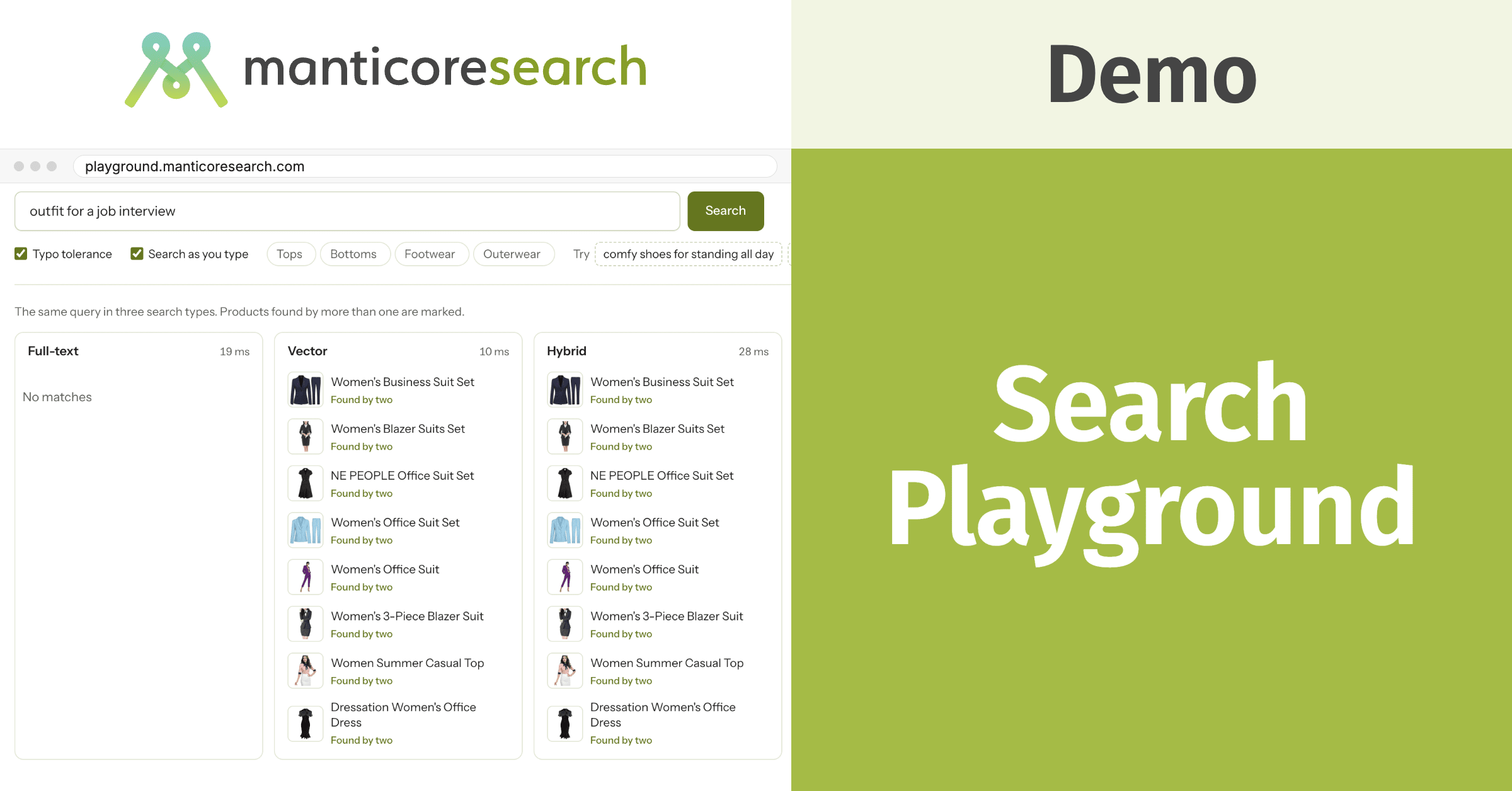
Now for a different problem, and a different kind of search. Someone doesn't type the name of a product. Instead, they describe what they need it for: outfit for a job interview . They're looking for something to wear to an interview.
Full-text search has a hard time with this one. By default, it joins words with AND (you can configure it differently, of course, but that's the default), and no product contains outfit, job, and interview together. So we get zero results.
Switch to the Vector tab, though, and you get business suits and blazer outfits. Even though the user never typed business suit or blazer.
SELECT id, title, description, features, category, image_url, knn_dist() AS distance
FROM convapparel_products
WHERE knn(embedding_vector, 100, 'outfit for a job interview')
LIMIT 12
Notice there's no ready-made vector in the SQL. We pass plain text. Manticore turns it into an embedding using the same model it used for the products, then finds the nearest vectors through an HNSW index . The model connects the query with descriptions containing words like business suit, office, and blazer.
Sometimes that even helps with typos. For example, warm waterprof jacket still brings back waterproof jackets, even though we haven't enabled any special typo correction here.
Sounds great, right? Well, let's get back to those socks from the beginning.
For merino wool socks , the first four results are a pair of merino wool pants, a jacket, another pair of pants, and a T-shirt. Socks come fifth.
Vector search picked up on merino wool but didn't give socks enough weight. It can be just as loose with a color, size, or specific product type. The meaning is close, but it's still the wrong product.
3. Hybrid search: if you can search by words and meaning, why choose?
After that socks example, there's an obvious question: why not combine the two approaches?

That's exactly what hybrid search does. Open merino wool socks in the Hybrid tab . Now socks come first, followed by other products made from merino wool.
Here's the SQL:
SELECT id, title, description, features, category, image_url,
    weight() AS text_score, knn_dist() AS distance
FROM convapparel_products
WHERE MATCH('merino wool socks')
  AND knn(embedding_vector, 100, 'merino wool socks')
LIMIT 12
OPTION fuzzy=1, fusion_method='rrf'
Manticore runs full-text and vector search, then combines their results using Reciprocal Rank Fusion (RRF) . In simple terms, it looks at where a product ranks in both lists. If it ranks highly in both, that helps push it up in the combined results.
You can see this in the interface, too. Each product has a Words, Meaning, or Words + meaning label showing which search method found it.
If both searches use the same text, there's also a shorter way to write it: hybrid_match()
. It runs full-text search, turns the query into a vector, performs KNN search, and combines the results with RRF.
Another example is bicycle shoes
. MTB cycling shoes and Unisex Bike Shoes show up in both full-text and vector search results. Vector search also finds Cycling Shoes, which don't contain the word bicycle at all. But there's a surprise: the top result is a pair of classic Paul Parkman Oxford shoes that have nothing to do with cycling. They just happen to have a bicycle toe design. That word match puts them at the top of the full-text results, and because vector search finds them too, hybrid search ranks them first.
And with warm waterprof jacket , the full-text part corrects the typo while the vector part helps find warm waterproof jackets. Both are useful, just in different ways.
Compare: three sets of results side by side
To save everyone from switching back and forth, we added a Compare tab. It runs the same query three ways — Full-text, Vector, and Hybrid — and displays the results in neighboring columns.
If a product appears in more than one set of results, Playground marks it. Hover over a product card and its appearances in the other columns are highlighted. Sometimes full-text and vector search really do find the same thing:

But it's more interesting when they disagree.
Try outfit for a job interview : the full-text column on the left is empty, while vector and hybrid search suggest business suits and blazer outfits.

Now try merino wool socks : full-text finds socks, vector search gets distracted by pants and jackets, and hybrid puts socks at the top.

The best way to compare these approaches is to use queries your own users actually enter, rather than ones we made up. If you just want to see how it works, start with bicycle shoes , lether jaket , or steel toe boots .
Similar products: no query text needed
Say someone's already looking at a leather jacket and wants to see something similar. They shouldn't have to type another query.
That's why product cards in Playground have two sections: Similar by description and Similar by photo.

Here's the SQL for finding similar products by description:
SELECT id, title, description, features, category, image_url, knn_dist() AS distance
FROM convapparel_products
WHERE knn(embedding_vector, 8, 2388085963546244483)
LIMIT 8
The number in knn() is a product ID
, not a vector. Manticore looks up the product's stored embedding and finds its nearest neighbors. The application doesn't need to fetch the vector from the database just to send it straight back again.
Finding similar photos works the same way. The only difference is that image vectors live in a separate table.
4. Search by photo
Ever tried describing a particular plaid shirt in a product listing? The name and specs might tell you about the fabric and size, but they don't always capture the pattern or exact shade. Sometimes it's easier to just look at the photos.
In the Image tab, you can type red plaid flannel shirt — or upload, drag in, or paste a picture of something you'd like to find.

In this demo, we use a specialized model to turn both text and photos into comparable vectors. So a description of a red plaid shirt and a photo of one end up close to each other in the multidimensional space used for vector search.

Unlike text-based vector search, image search uses a separate embedding service. First, it turns the query into a vector. In the public Playground, that usually takes 50–250 ms, and the page shows it as turned into a vector in … ms. Then Manticore finds the nearest image vectors and retrieves the corresponding products from the main table.
SELECT id, knn_dist() AS distance
FROM convapparel_product_images
WHERE knn(image_vector, 100, (-0.0021, -0.01, 0.0782, …))
LIMIT 100;

SELECT id, title, description, features, category, image_url
FROM convapparel_products
WHERE id IN (3698494869106650404, 3557146672156430291, 1902002584948931003, …)
LIMIT 100
We've shortened the SQL to make it readable. The real query includes all 512 numbers in the vector and 100 product IDs.
There are two choices we made here that might also come in handy in your app:
- Image search is independent of the main product catalog. We use MiniLM for text and Fashion CLIP for photos. Image vectors go into a separate table, so we can switch models or recalculate all the photo vectors without touching the products or their text search.
- We don't index repeated placeholder images. If you've ever crawled product catalogs, you've probably seen the same No image available image thousands of times. It tells you nothing about the actual product, so there's no point indexing it. In our demo, around 0.3% of the 82,524 products have no image vector.
5. Geo search: products on a map
We had one small problem with locations: ConvApparel doesn't have any coordinates. So we assigned products random locations around New York just to demonstrate how geo search works.
In the Geo tab, you can drag a point around the map, change the radius, and immediately see how the SQL changes.
SELECT id, title, description, features, category, image_url, lat, lon,
    GEODIST(40.712800, -74.006000, lat, lon, {in=degrees, out=km}) AS distance_km
FROM convapparel_products
WHERE distance_km <= 10
ORDER BY id ASC
LIMIT 100
GEODIST()
calculates distance. You can return it in SELECT, use it as a filter, or sort by it.
In our demo, points are sorted by id so they spread out across the selected area. For a real request like “show me the nearest stores,” you'd probably want ORDER BY distance_km ASC, so the closest locations come first.
6. AI search: Good counsel is beyond price
What if a shopper doesn't want to mess around with filters and product lists at all? Say they ask: What should I wear to a summer wedding on the beach?
In the Ask AI tab, they can ask that question and get an answer based on the products in the catalog.

Manticore has CALL CHAT for this:
CALL CHAT('What should I wear to a summer wedding on the beach?',
    'convapparel_products', 'shopping_assistant', '', 'embedding_vector')
CALL CHAT
works with a product table and a vector index. To answer a new question, the system can first find relevant products and pass their details to the language model. In our case, that's the title, description, and features fields. Playground adds links to the product cards in the answer.
You can keep the conversation going, too. For example, ask I need warm boots for walking the dog in snow, then follow up with Which of those are waterproof? The previous context is preserved, so you don't have to explain which boots you're talking about all over again.
A couple of things worth keeping in mind:
- Show the products behind the AI's recommendations. If it confidently recommends a “breathable dress,” users should be able to open the product page and check whether the description actually says that.
- Don't expect the language model to fix every search mistake. The right products have to make it into the context first. If an item wasn't found at that stage, the AI can't reliably take it into account when making a recommendation. So the quality of the model and the full-text search settings matter too.
And then there's speed. In the public Playground, an AI response usually takes 5–15 seconds. That depends on quite a few things, especially the LLM model and provider (or your own hardware if you run it locally, which Manticore supports too). We covered chat setup and how we evaluate its search quality in a separate article .
What if I want an HTTP API instead of SQL?
Manticore speaks two languages: SQL and JSON. We've shown plenty of SQL already, but if you prefer sending JSON over HTTP, the demo includes an equivalent curl command alongside each SQL query. It uses the HTTP JSON API
to run the same search.
For example, here's the request for our typo-filled query:
curl -X POST localhost:9308/search \
  -H 'Content-Type: application/json' \
  -d '{
  "table": "convapparel_products",
  "query": {"query_string": "lether jaket"},
  "options": {"fuzzy": true},
  "limit": 12,
  "_source": ["title", "description", "features", "category", "image_url"],
  "aggs": {"categories": {"terms": {"field": "categories"}, "sort": [{"count(*)": {"order": "desc"}}]}}
}'
If the table is already loaded into Manticore, this returns the same products and category breakdown.
And speaking of how full-text search joins words by default, there's a subtle difference between two kinds of JSON queries. query_string, just like SQL MATCH(), joins words with AND by default. But a JSON match query uses OR. Worth remembering if you're translating a query from one format to the other.
You can run the whole thing locally
Playground is on GitHub . All you need to run it locally is Docker Compose:
git clone https://github.com/manticoresoftware/demo-search-playground
cd demo-search-playground
cp .env.example .env
./scripts/init_manticore.sh
docker compose up --build app embed
Once it's running, open http://127.0.0.1:8000 .
The repository already includes precomputed product vectors, so you don't need to calculate them during setup. To try Ask AI, add your OpenRouter key to OPENROUTER_API_KEY in .env before starting. The other tabs don't need a key.
On the first run, the image embedding service downloads the Fashion CLIP model, which is about 600 MB. Everything else works while it downloads. And if you want to execute any SQL from the page yourself, use docker compose exec manticore mysql.
What to try in Playground: a quick cheat sheet
| Feature | In Manticore | Try it |
|---|---|---|
| Full-text search with relevance ranking | MATCH(), weight() | levis 501 |
| Typo tolerance | OPTION fuzzy=1, CALL QSUGGEST | lether jaket |
| Category facets | FACET | lether jaket |
| Autocomplete | CALL AUTOCOMPLETE | Type linen sh in the Full-text tab |
| Vector search with automatic embeddings | knn() with a text query | outfit for a job interview |
| Hybrid search | MATCH() + knn(), fusion_method='rrf' | merino wool socks |
| Similar products | knn() with a document ID | Open any product |
| Image search | knn() on photo vectors | red plaid flannel shirt or upload a photo |
| Geo search | GEODIST() | Geo tab |
| AI search | CALL CHAT | summer wedding on the beach |
| JSON API | /search endpoint | The curl command below any result |
The public Playground runs on a small server. Most queries, apart from AI chat, take around 5–100 ms.
After trying these examples, it's pretty clear why one search method won't work for everything. Full-text is great when the exact words matter. Vector search helps when someone describes what they need. Hybrid combines the two. Photos and locations call for their own kinds of search, and AI comes in handy when you want an answer rather than a list of products.
Of course, that doesn't mean we've exhausted all the ways search can get things wrong. There must be a query that full-text, vector, and hybrid search all fail at.
Can you come up with one?

Open Playground and give it a try. If you find a particularly bad query, open an issue on GitHub or tell us on Slack . And if you're building something similar yourself, feel free to start with the Playground source code .