# Introduction to full-text operators and basic search
In this tutorial, we will explore full-text search operators available in Manticore Search.
# Introduction to full-text operators and basic search
All search operations in Manticore Search are based on standard boolean operators (AND, OR, NOT) possible to be used in combination and free order to combine or exclude keywords in a search for more relevant results.
The default and the simplest full-text operator is AND which is assumed when you just enumerate few words in the search.
**AND** is a default operator with which the **`fast slow`** query will return documents that have the both terms: 'fast' and 'slow'. If one term is in a document and the other is not, the document will be not included in the resulting list.
By default, the words will be searched in all available full-text fields.
```sql
SELECT * FROM testrt WHERE MATCH('fast slow');
```
**OR** is used to match any term (or both). The terms are to be separated with a vertical line, e.g. **`fast | slow`**. It will find documents with either `fast` or `slow`.
```sql
SELECT * FROM testrt WHERE MATCH('fast | slow');
```
The OR operator has a higher precedence than the AND, so the query **'find me fast|slow'** can be interpreted as 'find me (fast|slow)':
```sql
SELECT * FROM testrt WHERE MATCH('find me fast | slow');
```
 **NOT** makes sure the term marked with `-` or `!` is not in the results. Any documents containing such term will be excluded. E.g **`fast !slow`** will find documents with `fast` if only there's no `slow` in them. Be careful using it trying to reduce the search, as it may become too specific and can rule out good documents.
```sql
SELECT * FROM testrt WHERE MATCH('find !slow');
SELECT * FROM testrt WHERE MATCH('find -slow');
```
**MAYBE** is a special operator which works like the `OR`, but requires the left term to always be in the results while the right term is optional. But when the both are met the document will get a higher search rank. E.g. **`fast MAYBE slow`** will find documents with either `fast` or `slow`, but the documents including the both terms will have a higher score.
```sql
SELECT * FROM testrt WHERE MATCH('find MAYBE slow');
```
## Usage examples
Let's connect to Manticore using mysql client:
```sql
# mysql -P9306 -h0
```
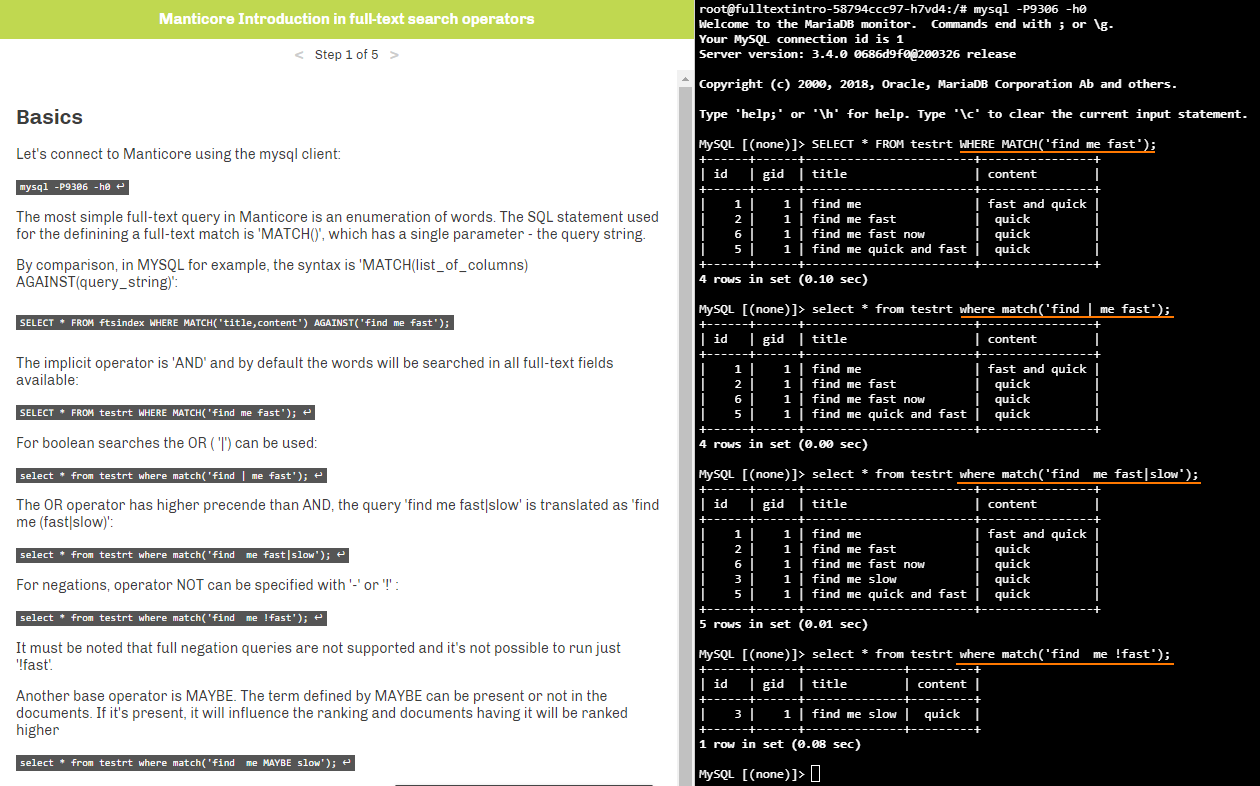
For boolean searches the OR operator `|` can be used:
```sql
MySQL [(none)]> select * from testrt where match('find | me fast');
+------+------+------------------------+----------------+
| id | gid | title | content |
+------+------+------------------------+----------------+
| 1 | 1 | find me | fast and quick|
| 2 | 1 | find me fast | quick |
| 6 | 1 | find me fast now | quick |
| 5 | 1 | find me quick and fast | quick |
+------+------+------------------------+----------------+
4 rows in set (0.00 sec)
```
The OR operator has higher precedence than AND, the query `find me fast|slow` is interpreted as `find me (fast|slow)`:
```sql
MySQL [(none)]> SELECT * FROM testrt WHERE MATCH('find me fast|slow');
+------+------+------------------------+----------------+
| id | gid | title | content |
+------+------+------------------------+----------------+
| 1 | 1 | find me | fast and quick|
| 2 | 1 | find me fast | quick |
| 6 | 1 | find me fast now | quick |
| 3 | 1 | find me slow | quick |
| 5 | 1 | find me quick and fast | quick |
+------+------+------------------------+----------------+
5 rows in set (0.00 sec)
```
For negations the operator NOT can be specified as `-` or `!`:
```sql
MySQL [(none)]> select * from testrt where match('find me -fast');
+------+------+--------------+---------+
| id | gid | title | content |
+------+------+--------------+---------+
| 3 | 1 | find me slow | quick |
+------+------+--------------+---------+
1 row in set (0.00 sec)
```
It must be noted that full negation queries are not supported in Manticore by default and it's not possible to run just `-fast` (will be possible since v3.5.2).
Another basic operator is `MAYBE`. The term defined by the MAYBE can be present or not in the documents. If it's present, it will influence the ranking and documents having it will be ranked higher.
```sql
MySQL [(none)]> select * from testrt where match('find me MAYBE slow');
+------+------+------------------------+----------------+
| id | gid | title | content |
+------+------+------------------------+----------------+
| 3 | 1 | find me slow | quick |
| 1 | 1 | find me | fast and quick|
| 2 | 1 | find me fast | quick |
| 5 | 1 | find me quick and fast | quick |
| 6 | 1 | find me fast now | quick |
+------+------+------------------------+----------------+
5 rows in set (0.00 sec)
```
## Field operator
If we want to limit the search to only a specific field operator '@' can be used:
```sql
mysql> select * from testrt where match('@title find me fast');
+------+------+------------------------+---------+
| id | gid | title | content |
+------+------+------------------------+---------+
| 2 | 1 | find me fast | quick |
| 6 | 1 | find me fast now | quick |
| 5 | 1 | find me quick and fast | quick |
+------+------+------------------------+---------+
3 rows in set (0.00 sec)
```
We can also specify multiple fields to limit the search:
```sql
mysql> select * from testrt where match('@(title,content) find me fast');
+------+------+------------------------+----------------+
| id | gid | title | content |
+------+------+------------------------+----------------+
| 1 | 1 | find me | fast and quick |
| 2 | 1 | find me fast | quick |
| 6 | 1 | find me fast now | quick |
| 5 | 1 | find me quick and fast | quick |
+------+------+------------------------+----------------+
4 rows in set (0.00 sec)
```
The field operator can also be used to perform a restriction for the search to be made only in the first x words. For example:
```sql
mysql> select * from testrt where match('@title lazy dog');
+------+------+----------------------------------------------------------------------------+---------------------------------------+
| id | gid | title | content |
+------+------+----------------------------------------------------------------------------+---------------------------------------+
| 4 | 1 | The quick brown fox jumps over the lazy dog | The five boxing wizards jump quickly |
| 7 | 1 | The quick brown fox take a step back and jumps over the lazy dog | The five boxing wizards jump quickly |
| 8 | 1 | The brown and beautiful fox take a step back and jumps over the lazy dog | The five boxing wizards jump quickly |
+------+------+----------------------------------------------------------------------------+---------------------------------------+
4 rows in set (0.00 sec)
```
However if we search in 5 first words only we get nothing:
```sql
mysql> select * from testrt where match('@title[5] lazy dog');
Empty set (0.00 sec)
```
In some situations search could be performed over multiple indexes that may not have same full-text fields.
By default specifying a field that doesn't exist in the index will result in a query error. To overcome this, special operator `@@relaxed` can be used:
```sql
mysql> select * from testrt where match('@(title,keywords) lazy dog');
ERROR 1064 (42000): index testrt: query error: no field 'keywords' found in schema
```
```sql
mysql> select * from testrt where match('@@relaxed @(title,keywords) lazy dog');
+------+------+----------------------------------------------------------------------------+---------------------------------------+
| id | gid | title | content |
+------+------+----------------------------------------------------------------------------+---------------------------------------+
| 4 | 1 | The quick brown fox jumps over the lazy dog | The five boxing wizards jump quickly |
| 7 | 1 | The quick brown fox take a step back and jumps over the lazy dog | The five boxing wizards jump quickly |
| 8 | 1 | The brown and beautiful fox take a step back and jumps over the lazy dog | The five boxing wizards jump quickly |
+------+------+----------------------------------------------------------------------------+---------------------------------------+
3 rows in set, 1 warning (0.01 sec)
```
## Fuzzy search
Fuzzy matching allows to match only some of the words from a query string, for example:
```sql
mysql> select * from testrt where match('"fox bird lazy dog"/3');
+------+------+----------------------------------------------------------------------------+---------------------------------------+
| id | gid | title | content |
+------+------+----------------------------------------------------------------------------+---------------------------------------+
| 4 | 1 | The quick brown fox jumps over the lazy dog | The five boxing wizards jump quickly |
| 7 | 1 | The quick brown fox take a step back and jumps over the lazy dog | The five boxing wizards jump quickly |
| 8 | 1 | The brown and beautiful fox take a step back and jumps over the lazy dog | The five boxing wizards jump quickly |
+------+------+----------------------------------------------------------------------------+---------------------------------------+
3 rows in set (0.00 sec)
```
In this case we use the `QUORUM` operator and specify that it is fine to match only 3 of the words. The search with `/1` is equivalent of the OR boolean search while the search with `/N` where the N is the number of the input words is equivalent of the AND search.
Instead of an absolute number, you can also specify a number between 0.0 and 1.0 (standing for 0% and 100%), and Manticore will match only the documents with at least the specified percentage of the given words. The same example above could also have been written as `"fox bird lazy dog"/0.3` and it would match documents with at least 30% of the 4 words.
```sql
mysql> select * from testrt where match('"fox bird lazy dog"/0.3');
+------+------+----------------------------------------------------------------------------+---------------------------------------+
| id | gid | title | content |
+------+------+----------------------------------------------------------------------------+---------------------------------------+
| 4 | 1 | The quick brown fox jumps over the lazy dog | The five boxing wizards jump quickly |
| 7 | 1 | The quick brown fox take a step back and jumps over the lazy dog | The five boxing wizards jump quickly |
| 8 | 1 | The brown and beautiful fox take a step back and jumps over the lazy dog | The five boxing wizards jump quickly |
+------+------+----------------------------------------------------------------------------+---------------------------------------+
3 rows in set (0.00 sec)
```
## Advanced operators
Besides the simpler operators there are many advanced operators that are used more seldom, but in some cases can be absolutely necessary.
One of the most used advanced operators is a phrase operator.
The phrase operator will match only if the given words are found in the verbatim specified order. This will also restrict the words to be found in the same field:
```sql
mysql> SELECT * FROM testrt WHERE MATCH('"quick brown fox"');
+------+------+-------------------------------------------------------------------+---------------------------------------+
| id | gid | title | content |
+------+------+-------------------------------------------------------------------+---------------------------------------+
| 4 | 1 | The quick brown fox jumps over the lazy dog | The five boxing wizards jump quickly |
| 7 | 1 | The quick brown fox take a step back and jumps over the lazy dog | The five boxing wizards jump quickly |
+------+------+-------------------------------------------------------------------+---------------------------------------+
2 rows in set (0.00 sec)
```
More relaxed version of the phrase operator is the strict order operator.
The order operator requires the words to be found in exactly same order as specified, but other words are accepted between:
```sql
mysql> SELECT * FROM testrt WHERE MATCH('find << me << fast');
+------+------+------------------------+---------+
| id | gid | title | content |
+------+------+------------------------+---------+
| 2 | 1 | find me fast | quick |
| 6 | 1 | find me fast now | quick |
| 5 | 1 | find me quick and fast | quick |
+------+------+------------------------+---------+
3 rows in set (0.00 sec)
```
Another pair of operators which work with word positions are the start/end field operators.
These will restrict a word to be present at the start or the end of a field.
```sql
mysql> SELECT * FROM testrt WHERE MATCH('^find me fast$');
+------+------+------------------------+---------+
| id | gid | title | content |
+------+------+------------------------+---------+
| 2 | 1 | find me fast | quick |
| 5 | 1 | find me quick and fast | quick |
+------+------+------------------------+---------+
2 rows in set (0.00 sec)
```
The proximity operator is similar to the AND operator, but adds the maximum distance between the words so they can still be considered a match. Let's take this example with just the AND operator:
```sql
mysql> SELECT * FROM testrt WHERE MATCH('brown fox jumps');
+------+------+----------------------------------------------------------------------------+---------------------------------------+
| id | gid | title | content |
+------+------+----------------------------------------------------------------------------+---------------------------------------+
| 4 | 1 | The quick brown fox jumps over the lazy dog | The five boxing wizards jump quickly |
| 7 | 1 | The quick brown fox take a step back and jumps over the lazy dog | The five boxing wizards jump quickly |
| 8 | 1 | The brown and beautiful fox take a step back and jumps over the lazy dog | The five boxing wizards jump quickly |
+------+------+----------------------------------------------------------------------------+---------------------------------------+
3 rows in set (0.00 sec)
```
Our query returns 2 results: one in which all the words are close to each other and the second where one of the words is more distant.
If we want to match only if the words are within a certain distance, we can restrict that with the proximity operator:
```sql
mysql> SELECT * FROM testrt WHERE MATCH('"brown fox jumps"~5');
+------+------+---------------------------------------------+---------------------------------------+
| id | gid | title | content |
+------+------+---------------------------------------------+---------------------------------------+
| 4 | 1 | The quick brown fox jumps over the lazy dog | The five boxing wizards jump quickly |
+------+------+---------------------------------------------+---------------------------------------+
1 row in set (0.00 sec)
```
More generalized version of the proximity operator is the `NEAR` operator. In case of the proximity a single distance is specified over a bag of words, while the `NEAR` operator works with 2 operands, that can be either single words or expressions.
In the following example, 'brown' and 'fox' must be within a distance of 2 and 'fox' and 'jumps' within a distance of 6:
```sql
mysql> SELECT * FROM testrt WHERE MATCH('brown NEAR/2 fox NEAR/6 jumps');
+------+------+-------------------------------------------------------------------+---------------------------------------+
| id | gid | title | content |
+------+------+-------------------------------------------------------------------+---------------------------------------+
| 4 | 1 | The quick brown fox jumps over the lazy dog | The five boxing wizards jump quickly |
| 7 | 1 | The quick brown fox take a step back and jumps over the lazy dog | The five boxing wizards jump quickly |
+------+------+-------------------------------------------------------------------+---------------------------------------+
2 rows in set (0.00 sec)
```
The query leaves out one document which doesn't match the first `NEAR` condition (the last one here):
```sql
mysql> SELECT * FROM testrt WHERE MATCH('brown NEAR/3 fox NEAR/6 jumps');
+------+------+----------------------------------------------------------------------------+---------------------------------------+
| id | gid | title | content |
+------+------+----------------------------------------------------------------------------+---------------------------------------+
| 4 | 1 | The quick brown fox jumps over the lazy dog | The five boxing wizards jump quickly |
| 7 | 1 | The quick brown fox take a step back and jumps over the lazy dog | The five boxing wizards jump quickly |
| 8 | 1 | The brown and beautiful fox take a step back and jumps over the lazy dog | The five boxing wizards jump quickly |
+------+------+----------------------------------------------------------------------------+---------------------------------------+
3 rows in set (0.09 sec)
```
A variation of the `NEAR` operator is `NOTNEAR`, which matches only if the operands have a minimum distance between them.
```sql
mysql> SELECT * FROM testrt WHERE MATCH('"brown fox" NOTNEAR/5 jumps');
+------+------+-------------------------------------------------------------------+---------------------------------------+
| id | gid | title | content |
+------+------+-------------------------------------------------------------------+---------------------------------------+
| 7 | 1 | The quick brown fox take a step back and jumps over the lazy dog | The five boxing wizards jump quickly |
+------+------+-------------------------------------------------------------------+---------------------------------------+
1 row in set (0.00 sec)
```
Manticore can also detect sentences in plain texts and paragraphs in HTML content.
For indexing sentences the **[index_sp](http://mnt.cr/index_sp)** option needs to be enabled, while paragraphs also require **[html_strip](http://mnt.cr/html_strip)=1**. Let's take the following example:
```sql
mysql> select * from testrt where match('"the brown fox" jumps')G
*************************** 1. row ***************************
id: 15
gid: 2
title: The brown fox takes a step back. Then it jumps over the lazydog
content:
1 row in set (0.00 sec)
```
The document includes 2 sentences, while the phrase is found in the first one 'jumps' is only in the second sentence.
With the SENTENCE operator we can restrict the search to match only if the operands are in the same sentence:
```sql
mysql> select * from testrt where match('"the brown fox" SENTENCE jumps')G
Empty set (0.00 sec)
```
We can see that the document is not a match any more. If we correct the search query so all the words are from the same sentence we'll see a match:
```sql
mysql> select * from testrt where match('"the brown fox" SENTENCE back')G
*************************** 1. row ***************************
id: 15
gid: 2
title: The brown fox takes a step back. Then it jumps over the lazydog
content:
1 row in set (0.00 sec)
```
To demonstrate the PARAGRAPH let's use the following search:
```sql
mysql> select * from testrt where match('Samsung Galaxy');
+------+------+-------------------------------------------------------------------------------------+---------+
| id | gid | title | content |
+------+------+-------------------------------------------------------------------------------------+---------+
| 9 | 2 | Samsung Galaxy S10
Is a smartphone introduced by Samsung in 2019 | |
| 10 | 2 | Samsung
Galaxy,Note,A,J | |
+------+------+-------------------------------------------------------------------------------------+---------+
2 rows in set (0.00 sec)
```
These 2 documents have different HTML tags
If we add the PARAGRAPH only the document with the search terms found in the single tag will remain.
The more general operators are ZONE and it's variant ZONESPAN. "zone" is text inside an HTML or XML tag.
The tags to be considered for the zones need to be declared in the `index_zones` setting, like `index_zones = h*, th, title`.
For example:
```sql
mysql> select * from testrt where match('hello world');
+------+------+-------------------------------+---------+
| id | gid | title | content |
+------+------+-------------------------------+---------+
| 12 | 2 | Hello world | |
| 14 | 2 | Hello world
| |
| 13 | 2 | Hello
world
| |
+------+------+-------------------------------+---------+
3 rows in set (0.00 sec)
```
We have 3 documents, where 'hello' and 'world' are found in plain text, in different zones of the same type or in a single zone.
```sql
mysql> select * from testrt where match('ZONE:h1 hello world');
+------+------+-------------------------------+---------+
| id | gid | title | content |
+------+------+-------------------------------+---------+
| 14 | 2 | Hello world
| |
| 13 | 2 | Hello
world
| |
+------+------+-------------------------------+---------+
2 rows in set (0.00 sec)
```
In this case, the words are present in H1 zones, but they are not required to be in the same zone. If we want to limit the match to a single zone, we can use ZONESPAN:
```sql
mysql> select * from testrt where match('ZONESPAN:h1 hello world');
+------+------+----------------------+---------+
| id | gid | title | content |
+------+------+----------------------+---------+
| 14 | 2 | Hello world
| |
+------+------+----------------------+---------+
1 row in set (0.00 sec)
```
Hopefully, from this article you've learned how [full-text search operators](https://docs.manticoresearch.com/latest/html/searching/boolean_query_syntax.html) work in Manticore. If you are looking for a hands on experience to learn it even better you can [try our interactive course](https://play.manticoresearch.com/fulltextintro/) right now in your browser.
### [Interactive Course](https://play.manticoresearch.com/fulltextintro/)
[](https://play.manticoresearch.com/fulltextintro/)
You can learn more about full-text matching if you try our "Introduction in full-text operators" [interactive course](https://play.manticoresearch.com/fulltextintro/) which features a command line for easier learning.