

TL;DR
Building a KNN index used to be the slow part of saving and merging tables with vector attributes. As of release v27.1.5
, Manticore can use several CPU cores for this work during chunk saves, OPTIMIZE merges, auto-optimize, and ALTER TABLE ... REBUILD KNN. On a 16-core Ryzen 9 5950X, building a KNN index for 1 million 1536-dimensional vectors dropped from 8 minutes to 39 seconds.
Why HNSW index build speed matters
Manticore uses HNSW graphs to power KNN search over float_vector attributes. You can think of an HNSW graph as a map that helps Manticore quickly find vectors that are close to the query vector.
Building that map can take a long time. For tables without KNN, saving or merging data is mostly about writing ordinary table data. For tables with KNN, Manticore also has to insert every vector into an HNSW graph, and that extra work can dominate the total time.
This matters most after large inserts and during maintenance. Fresh data is saved from memory to disk chunks. Existing chunks are later merged by OPTIMIZE or auto-optimize. Each saved or merged chunk needs its own HNSW graph, so faster graph building means shorter waits after bulk loading, faster background optimization, and less time spent on maintenance operations.
Disk chunk count matters for search too. Manticore stores RT tables as disk chunks, and each chunk has its own HNSW graph. A KNN query searches every chunk and merges the results, so fewer chunks usually mean faster KNN queries. The fastest layout is often one chunk with one graph.
Auto-optimize
does not go all the way to one chunk by default. It merges chunks in the background, but stops when the table reaches a target chunk count. For ordinary tables, the target is 2 * num_logical_cpus; for tables with a KNN attribute, it is lower: num_physical_cpus / 2. On a 32-thread / 16-core host, that means 8 chunks for a KNN table instead of 64 for an ordinary table. The KNN target is lower because extra chunks hurt KNN search latency more, but the default still leaves more than one graph. To make auto-optimize converge to a single chunk, set optimize_cutoff
to 1 server-wide, per table, or at runtime with SET GLOBAL optimize_cutoff = 1. You can also do it manually with OPTIMIZE TABLE ... OPTION cutoff = 1
.
What used to happen
Freshly inserted documents first accumulate in a RAM chunk. When that RAM chunk reaches rt_mem_limit , which defaults to 128MB, Manticore saves it as a new disk chunk. For a table with a KNN attribute, that save includes building a fresh HNSW graph from the vectors in the RAM chunk.
The same kind of HNSW build happens when disk chunks are merged. OPTIMIZE TABLE and auto-optimize read live rows from existing chunks, write a new merged chunk, and build a new HNSW graph for that merged result. ALTER TABLE ... REBUILD KNN, and ALTER operations that add or drop a float_vector column, also rebuild the graph.
Before this change, the HNSW part of each individual save, merge, or rebuild used one worker:
- A RAM-to-disk chunk save walked all live rows from the RAM chunk's segments one by one and inserted their vectors into one HNSW graph.
- A chunk merge walked all live rows from the input disk chunks one by one and inserted their vectors into the new graph.
ALTER TABLE ... REBUILD KNNrebuilt each graph in one worker.
Manticore already had some parallelism around these operations. Up to 2 RAM-chunk saves can run at the same time. The optimizer can also run several chunk merges at once, controlled by parallel_chunk_merges . The default is 2 when the host has enough CPU cores. But inside each individual save or merge, the KNN graph build was still single-worker. On KNN-heavy tables, that single worker often determined how long the whole operation took.
What changed
Manticore now splits one KNN graph build across several workers. Each worker gets part of the rows, inserts its vectors into the same destination graph, and finishes independently. The graph-building library coordinates those concurrent inserts so the graph remains valid.
The exact split depends on the operation:
- During RAM-to-disk saves, workers take RAM segments from a shared queue until all segments are processed.
- During chunk merges and
ALTER TABLE ... REBUILD KNN, Manticore divides the live rows into similarly sized ranges so the work is spread evenly.
Single-thread improvements
The same release also improves the single-worker path. Even when knn_parallel_build is set to 1, the benchmark below shows a 10% improvement before adding parallelism. That comes from three changes:
- Two-pass neighbor processing. When inserting a vector, the algorithm walks through candidate neighbors and computes distances to them. The new code splits that into two passes: the first pass walks the neighbor list and prefetches the vector data, and the second pass computes the distances. This gives the CPU time to bring the vectors into cache before they are used.
- Two comparisons at a time. Some distance calculations now process two candidate vectors together. This reduces repeated work in the inner loop where most of the build time is spent.
- Compile-time distance dispatch in build mode. The builder now picks the right distance function once for the build, such as inner product vs. L2 and raw float vs. binary-quantized vectors. That avoids a function-pointer lookup on every distance call and lets the compiler optimize the inner loop more aggressively.
The default and the config
A new searchd setting, knn_parallel_build
, controls how many workers one KNN build may use. The default is min(4, threads / 4), where threads is Manticore's threads
setting - the size of the worker pool that runs queries and background tasks, which defaults to the number of logical CPU cores on the host.
In practical terms, that means one worker on small hosts and up to four workers by default on larger hosts: a 4-thread host gets one worker, an 8-thread host gets two, a 16-thread host gets four, and anything above that is also capped at four. The default is conservative because production machines often need to handle searches, inserts, and background work at the same time.
You usually do not need to change it. Consider raising it when you are rebuilding or optimizing a KNN-heavy table on a host that is not serving live traffic:
SET GLOBAL knn_parallel_build = 16;
Set it to 1 if you need the old single-worker behavior:
SET GLOBAL knn_parallel_build = 1;
The value can also be set in the searchd config and checked with SHOW VARIABLES.
CPU usage
Multiple saves and merges can be active at the same time, and each one can use up to knn_parallel_build workers. These workers use Manticore's existing threads pool. They do not create an unlimited number of extra operating-system threads; if all pool threads are busy, extra work waits in the queue.
This is why the default leaves headroom. On a 32-thread host, the default is 4 workers per KNN build. If two chunk saves overlap, the KNN build work can use up to 8 workers, leaving the rest of the thread pool available for other work.
Benchmark
Setup:
- AMD Ryzen 9 5950X (16 physical / 32 logical cores)
- Dataset: dbpedia-openai-1M - 1M vectors, 1536 dimensions, cosine distance
- Quantization: 1-bit (binary) quantization
- Data inserted into an RT table, then
OPTIMIZEto a single disk chunk - Measurement:
ALTER TABLE knn_data REBUILD KNN, three runs per setting, single-chunk so timings are stable - HNSW settings: defaults
ALTER TABLE ... REBUILD KNN was used because it exercises the same parallel build path as chunk saves and chunk merges, while giving stable timings that are easy to reproduce.
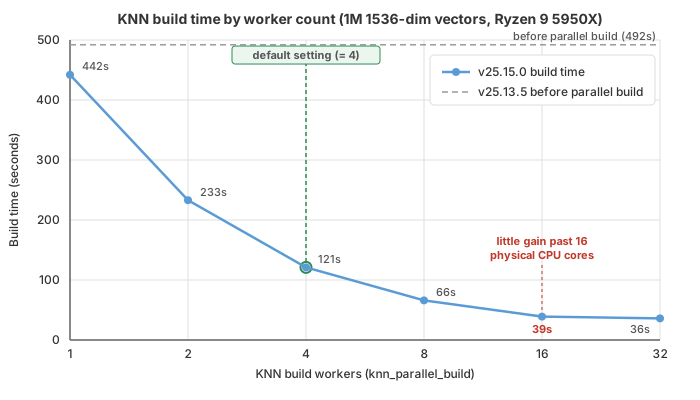
Results:
- With one worker, the new code is already 10% faster than the old code: 492 seconds dropped to 442 seconds.
- With 16 workers, rebuild time dropped to 39 seconds, about 11x faster than the new one-worker result.
- Going from 16 to 32 workers helped only a little: 39 seconds became 36 seconds. On this machine, the useful limit is close to the 16 physical CPU cores.
- The default is meant for shared production hosts. For maintenance work on a dedicated host, raising
knn_parallel_buildcan be worth it.
Migration
No action is required. Existing tables keep working, and KNN graphs built by the parallel path are functionally equivalent to graphs built by the old single-worker path.
One detail can matter for strict reproducibility: parallel workers may insert vectors in a different order, so Manticore's on-disk KNN graph file, stored with the .spknn extension, is not guaranteed to be byte-for-byte identical to a single-worker build. Search quality and query speed are expected to be the same. If byte-for-byte reproducibility matters, set knn_parallel_build = 1.
Conclusion
This change speeds up one of the slowest maintenance steps for KNN tables. Parallel graph building reduces the time needed to save chunks, merge chunks, and rebuild KNN data, while the improved single-worker path also speeds up builds on smaller systems. Existing tables continue to work without changes. When CPU resources are available during maintenance, knn_parallel_build can be raised to build KNN graphs faster.