

Both search engines return six documents. The import looks good. Then someone searches for connection timeout, and the new application returns two results where the old one returned four.
Equal document counts are a useful first check in data migration testing. They do not tell you whether searches return the same results or whether the target has the latest updates.
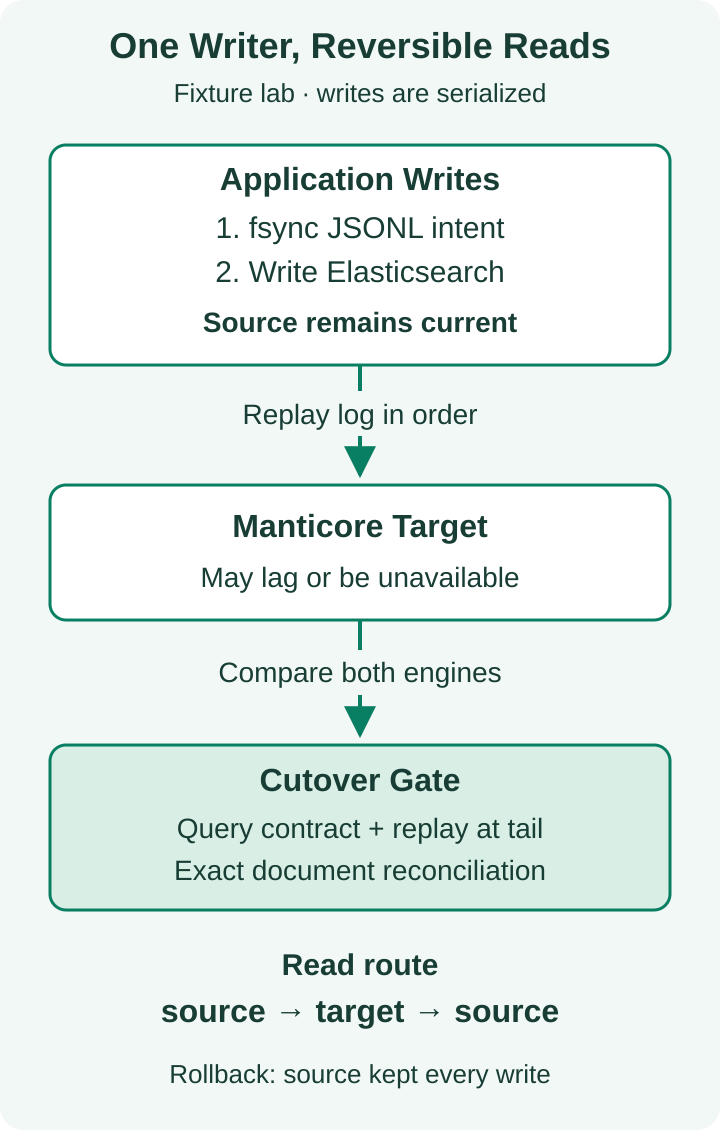
This small lab rehearses a migration of synthetic technical issues and documentation from Elasticsearch to Manticore. It seeds both engines from identical fixtures to simulate a completed import, then compares paired queries, catches a bad translation, replays changes, and switches application reads in both directions. Elasticsearch keeps receiving every write, including after the read switch. That makes rollback possible within the boundaries of this example.
If you need the import step itself, see the migration tool article or the Elasticdump walkthrough . This lab focuses on the next decision: whether the target is ready to serve application reads, and whether you can switch back after more writes.
The Lab and Its Boundaries
Download the runnable lab and its SHA-256 checksum . The archive includes Python source, Compose configuration, fixtures, schemas, expected comparisons, actual HTTP responses, a write log, and container logs. The Python harness uses only the standard library.
The captured run used Elasticsearch 9.5.5 and Manticore 29.9.0. Elasticsearch 9.5.5 was the newest release when the lab was prepared; 9.5.6 came out on 2 November 2026 and was not tested. 29.9.0 was still the newest numbered Manticore image tag when the lab was re-run on 9 November 2026. Both images are pinned by tag and digest in compose.yaml; the test also records runtime versions.
This is a local, single-process experiment with no concurrent writers or live traffic. It compares engines by replaying fixture queries rather than mirroring application traffic. It does not demonstrate zero downtime. The target requests use Manticore SQL over HTTP; they are written separately from the Elasticsearch DSL.

Open the diagram at full size .
A Small Search Contract
The lab starts with six short records:
| ID | Body | Kind | Priority |
|---|---|---|---|
| 1 | Connection timeout after restart | issue | 2 |
| 2 | Connection pool tuning guide | guide | 2 |
| 3 | Request timeout troubleshooting | guide | 1 |
| 4 | Connection reset before timeout | issue | 2 |
| 5 | API2 authentication reference | reference | 1 |
| 6 | API authentication reference | reference | 1 |
Each positive numeric ID is stable. In Elasticsearch it is both the document _id and a mapped long field used for sorting. In Manticore it is the document id. An application with string IDs would need a separate, persistent mapping; this example does not hash them into numbers.
| Source mapping | Target schema | Purpose |
|---|---|---|
body: text, simple analyzer | body text | Full-text search and stored body |
kind: keyword | kind string | Exact filter and grouping |
priority: integer | priority int | Range filter and sorting |
id: long, also used as _id | Built-in id | Identity and final sort key |
The source uses a strict mapping, and the target table has an explicit schema:
CREATE TABLE docs(body text, kind string, priority int)
  morphology='none' stopwords=''
  charset_table='0..9, A..Z->a..z, a..z'
  rt_mem_limit='32M';
This is an ASCII fixture, not a multilingual analyzer recipe. The chosen Manticore charset settings retain digits and fold uppercase letters. Elasticsearch's simple analyzer splits on non-letters and lowercases letters. We test that difference rather than assume these configurations are equivalent.
Every compared result is ordered by priority DESC, id ASC. The ID resolves ties. We compare ordered IDs and category counts, not raw relevance scores. The application would need a separate relevance evaluation
if its normal result order depended on ranking. See Manticore sorting and ranking
for those controls.
The First Gate Catches a Bad Translation
Here is the source request for the opening example:
POST /docs/_search
{
  "query": {"match": {"body": "connection timeout"}},
  "sort": [{"priority": "desc"}, {"id": "asc"}],
  "from": 0,
  "size": 100,
  "track_total_hits": true
}
The deliberately bad target request is:
SELECT id FROM docs
WHERE MATCH('connection timeout')
ORDER BY priority DESC, id ASC
LIMIT 0,100;
The actual results are Elasticsearch [1, 2, 4, 3], Manticore [1, 4]. Neither server failed. The translation changed the question.
Elasticsearch's match query
defaults to OR between analyzed terms. Manticore's full-text operators
use implicit AND between adjacent terms. The test asserts these differing results, then passes the failed parity result to the cutover gate and checks that it refuses the switch.
For this OR query, the corrected target is:
SELECT id FROM docs
WHERE MATCH('connection | timeout')
ORDER BY priority DESC, id ASC
LIMIT 0,100;
It returns [1, 2, 4, 3]. That fixes this query; it does not create a general Elasticsearch query translator. The harness only builds fixed, reviewed queries. It is not an example of safely interpolating arbitrary user input into SQL or MATCH().
What the Comparisons Cover
These are the captured results before any mutations. Full paired requests and expected IDs are in evidence/comparisons.json inside the archive; the assertions live in harness.py.
| Case | Elasticsearch | Manticore | Expected |
|---|---|---|---|
| Bad OR translation | [1,2,4,3] | [1,4] | DIFFERENT; blocks gate |
| Corrected OR | [1,2,4,3] | [1,2,4,3] | SAME |
| Explicit AND | [1,4] | [1,4] | SAME |
Phrase connection timeout | [1] | [1] | SAME |
connection, kind issue, priority ≥ 2 | [1,4] | [1,4] | SAME |
Second page of connection, offset 2, size 2 | [4] | [4] | SAME |
API2 tokenizer probe | [5,6] | [5] | DIFFERENT; outside cutover contract |
The AND case sends operator: "and" on the source and adjacent terms on the target. The phrase case uses Elasticsearch match_phrase
and MATCH('"connection timeout"'). Document 4 contains both words, but they are not adjacent.
For structured filters, the source uses bool with term and range filters. The target uses:
WHERE MATCH('connection') AND kind='issue' AND priority>=2
For pagination, Elasticsearch from: 2, size: 2 becomes Manticore LIMIT 2,2, with the same explicit sort. This checks a shallow page over unchanged data. It does not establish stable pagination while documents are changing.
The aggregation check compares an Elasticsearch terms aggregation
on kind with Manticore grouping
:
SELECT kind, COUNT(*) AS n FROM docs GROUP BY kind LIMIT 10;
Both produce guide: 2, issue: 2, reference: 2. The harness normalizes buckets into a dictionary; bucket order is not part of this contract. There is one source shard and only three categories. This result says nothing about top-bucket accuracy across a large distributed collection.
The API2 case stays different even after the OR fix. The captured _analyze response contains api; Manticore CALL KEYWORDS('API2', 'docs') returns normalized api2. That explains why the source also finds document 6.
This identifier search is deliberately excluded from the lab's read-cutover contract. It is a regression assertion with different expected results, not a parity pass. If your application requires equivalent identifier search, this mismatch must block your cutover until you change the analyzer/schema or the search design and retest. Merely labeling a mismatch “expected” does not make it acceptable to users.
Keeping the Source Current for Rollback
A read-route flag alone is not a rollback strategy. The old source must still contain the writes made after the switch.
The archived App class handles writes and routing changes in one process. Both engines are seeded before writes begin. Each mutation follows this order:
- Append a full replacement document or delete intent to a JSONL log, flush it, and call
fsync. - Write Elasticsearch, using
refresh=wait_forso the following test read can observe it. - Later, replay the file in sequence into Manticore. Advance the in-memory watermark only after a target operation succeeds.
Updates use full-document replacement; deletes use the stable ID. Manticore's replacement operation lets the fixture replay the same replacement again. The test repeats the entire log, including the delete, and checks that both collections still agree.
The gate requires all three checks to pass: the agreed SAME-query suite, replay through the end of the log, and a match between every projected document in the two engines. Data reconciliation compares id, body, kind, and priority, ordered by ID. It reads at most 100 rows, which is enough for this fixture and unsuitable for a production scan.
A source write failure aborts the run. The log and Elasticsearch are not one transaction: a crash or ambiguous timeout between them needs recovery logic that this harness does not implement. The route and replay watermark also live in memory. The write path is good enough to test a controlled experiment. It is not a production outbox or a crash-safe dual-write system.
The Failure Tests and Read Switch
The harness exercises the sequence rather than just describing it:
| Step | Action | Observed check |
|---|---|---|
| Stale target | Change document 1's body on the source | Counts remain six; cutover is refused because replay is pending |
| Reconciliation alone | Mark that replay as done without applying it | Pending-replay check passes; document reconciliation fails; cutover is refused |
| Delete during migration | Delete document 2 on the source | Delete is recorded for replay |
| Target outage | Stop this project's Manticore, then write document 7 | Source accepts the write; target replay fails; source reads include 7 |
| Catch-up | Start Manticore and replay the log, then replay it again | All projected documents agree; repeated replay preserves the result |
| Read cutover | Rerun comparisons on the changed corpus and pass the gate | Target search returns [1,4,3]; document 2 is absent |
| New write | Write document 8 after switching reads, then replay | Both collections contain the new document |
| Rollback | Set the read route back to the source | Source IDs are [1,3,4,5,6,7,8]; updated body and delete are still correct |
In the stale-target step the pending-replay check rejects the cutover before reconciliation runs. The next step therefore marks the replay as done without applying it, so that document reconciliation is the only failing check, and the harness confirms that the switch is still refused. The range-filter fixture does not contain a matching low-priority issue, so add one before relying on it to catch an omitted range filter.
The application has separate source and target adapters for its fixed OR search. App.search() chooses the adapter according to route; App.read() uses the same route to retrieve all IDs for verification. The read switch does not change the write destination. Elasticsearch remains the source of every mutation throughout this run.
Selected lines from the captured successful test:
PASS bad translation blocks parity gate
PASS corrected fixture parity; tokenizer exception remains explicit
PASS stale target blocks cutover (equal counts, changed body)
PASS reconciliation alone blocks cutover (replay marked done, body stale)
PASS target unavailable; source write 7 retained; replay pending
PASS catch-up, repeat replay, reconciliation, switch reads to target
PASS new write after cutover; rollback reads source with update/delete/new writes intact
ALL TESTS PASSED
In this test, the source accepts a write while the target is unavailable. It does not prove behavior under a source failure, a process crash, concurrent writers, or every network failure. While target reads are selected, they can be stale until replay finishes. The harness controls when replay runs; an application using this pattern would need to decide how to handle that stale-read interval.
Running the Same Experiment
Use Docker Engine with Compose v2 and Python 3.9 or later on Linux. The captured run used x86_64. Allow at least 3 GB of free RAM plus Docker overhead, and disk space for both images. The archive needs no Python packages. Three runs on a busy shared server took 1 min 25 s, 1 min 49 s and 3 min 11 s, including container start-up.
Download the archive and checksum linked above into the same directory, then run:
sha256sum -c query-parity-lab.tar.gz.sha256
tar -xzf query-parity-lab.tar.gz
cd query-parity-lab
sha256sum -c SHA256SUMS
./test.sh
Compose publishes only 127.0.0.1:39200 for Elasticsearch and 127.0.0.1:39408 for Manticore. It uses the project name es-query-parity-lab, two dedicated volumes, CPU limits of 2 and 1, and memory limits of 1536 MiB and 512 MiB respectively. Elasticsearch has a 512 MiB heap; the Manticore table has a 32 MiB RT memory limit.
The local configuration uses single-node discovery
and disables memory mapping through node.store.allow_mmap
. It needs no privileged container or host sysctl change. Security is disabled for this disposable lab; container-network peers can still reach it. Do not use this configuration as a production deployment.
If either port is occupied, set ES_PORT and MANTICORE_PORT before running ./test.sh; set COMPOSE_PROJECT_NAME to change the project name, and use the same value for the cleanup command below. Run only one copy of this project at a time. The script recreates the docs index/table and really stops its Manticore service during the failure test. Keep it pointed at these isolated services.
Fresh results go into run/test.log, run/comparisons.json, run/http-trace.json, and run/write-log.jsonl. Successful runs also capture container logs and service status. The shipped evidence/ directory preserves the author's run so you can compare it with yours. That run used the project name polish-pr301 and host ports 42200 and 42208 through the three variables above, so those values appear in its logs. Assertions enforce expected outcomes and make the script exit nonzero on failure.
After inspection, remove only this project's containers, network, and fixture volumes:
docker compose down -v
Before Applying This Pattern Elsewhere
Start with a concrete search contract and make passing it one of your cutover criteria. Replace these fixtures with representative queries and reviewed expected behavior. Keep deliberate differences visible, and resolve any that affect the route you intend to switch.
A real application also needs a consistent initial snapshot, durable change capture, durable replay checkpoints, ordering across writers, and recovery for source/log failure windows. Those are separate problems from query translation. This lab does not cover deep pagination , nested data, Unicode equivalence, synonyms, relevance quality, or production load.
Before switching reads, check the queries your application depends on, reconcile the documents, and verify that the source can still serve reads after new writes. This lab gives you a runnable example of those checks, including a query difference that must remain visible.